Short answer: to write a negative number in two's complement, pick a bit width, write the positive number in binary at that width, invert every bit, and add 1. In 8 bits, -5 becomes 0000 0101 → 1111 1010 → 1111 1011, or 0xFB. To read a pattern back, check the top bit: if it is 0 the value is positive; if it is 1, take the unsigned value and subtract 2ⁿ. So 0xFB is 251 − 256 = -5.
That is the whole method. The rest of this guide covers why it works, how to read signed values in hex dumps and logs, and the three mistakes that cause most real bugs: wrong width, wrong extension and silent overflow.
Why computers use two's complement
A fixed number of bits can only hold a fixed number of patterns. Eight bits give 256 patterns. If you read them as unsigned, they mean 0 to 255. If you read them as signed two's complement, the same 256 patterns mean -128 to 127.
The trick is that the top bit carries a negative weight. In 8 bits, the bit positions are worth -128, 64, 32, 16, 8, 4, 2 and 1. So 1111 1011 is -128 + 64 + 32 + 16 + 8 + 2 + 1 = -5. You can check any value this way, and it is a good way to build intuition.
This layout has one big advantage: addition and subtraction work the same way for signed and unsigned numbers. The processor adds the bits and keeps the low n bits; only the interpretation changes. There is one zero (0000 0000), not a "positive zero" and a "negative zero", which is why two's complement replaced older schemes such as sign-and-magnitude.
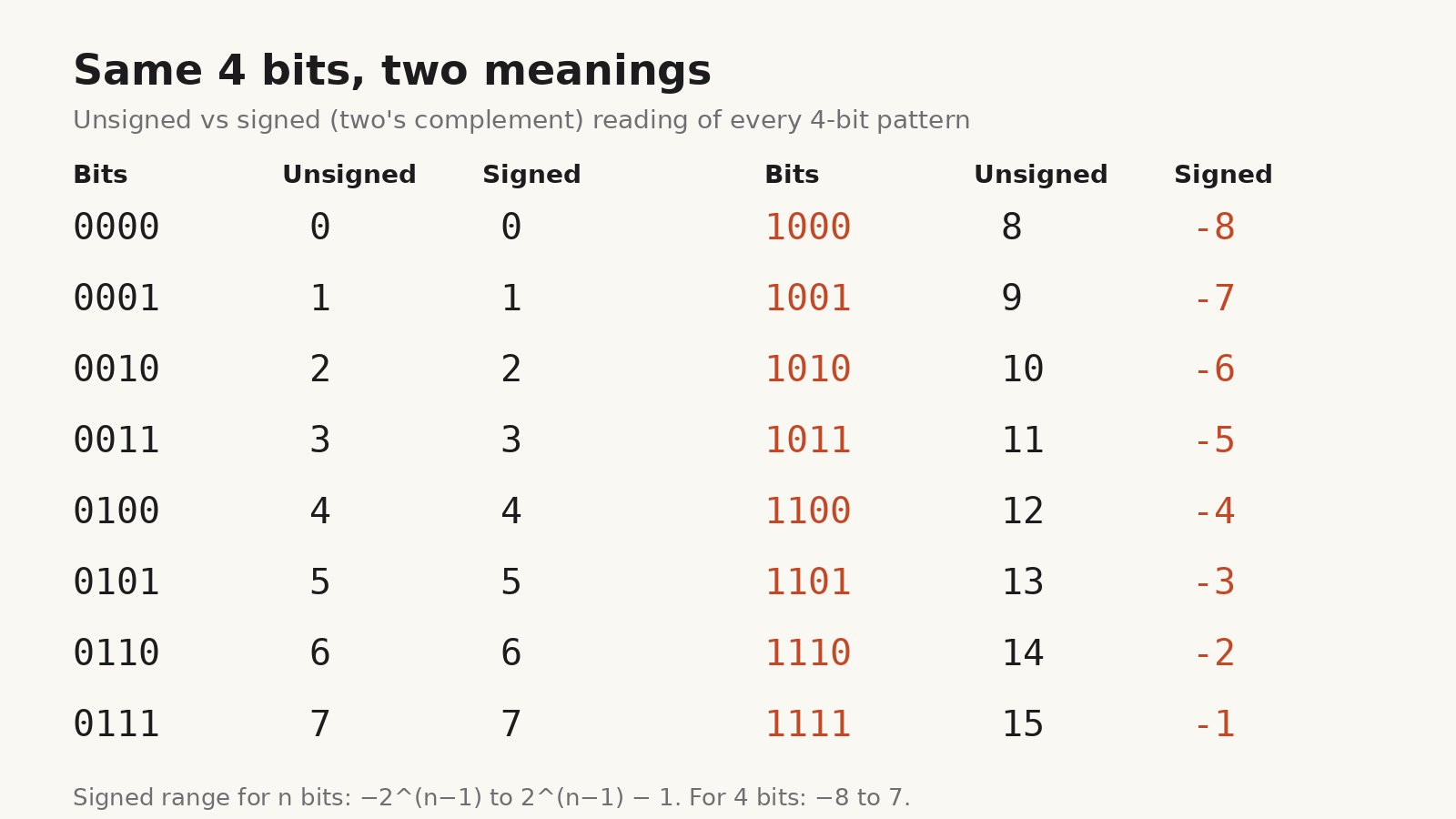
The 4-bit table shows the pattern clearly. From 0000 to 0111 both readings agree. From 1000 onwards, the signed reading is the unsigned value minus 16, so 1111 is 15 unsigned and -1 signed.
The range for each width
For n bits, the signed range is -2ⁿ⁻¹ to 2ⁿ⁻¹ − 1:
| Width | Signed range | Unsigned range |
|---|---|---|
| 8-bit | -128 to 127 | 0 to 255 |
| 16-bit | -32,768 to 32,767 | 0 to 65,535 |
| 32-bit | -2,147,483,648 to 2,147,483,647 | 0 to 4,294,967,295 |
| 64-bit | -9,223,372,036,854,775,808 to 9,223,372,036,854,775,807 | 0 to 18,446,744,073,709,551,615 |
The range is not symmetric. There is one more negative value than positive, because zero takes one of the "non-negative" patterns.
How to write a negative number in binary, step by step
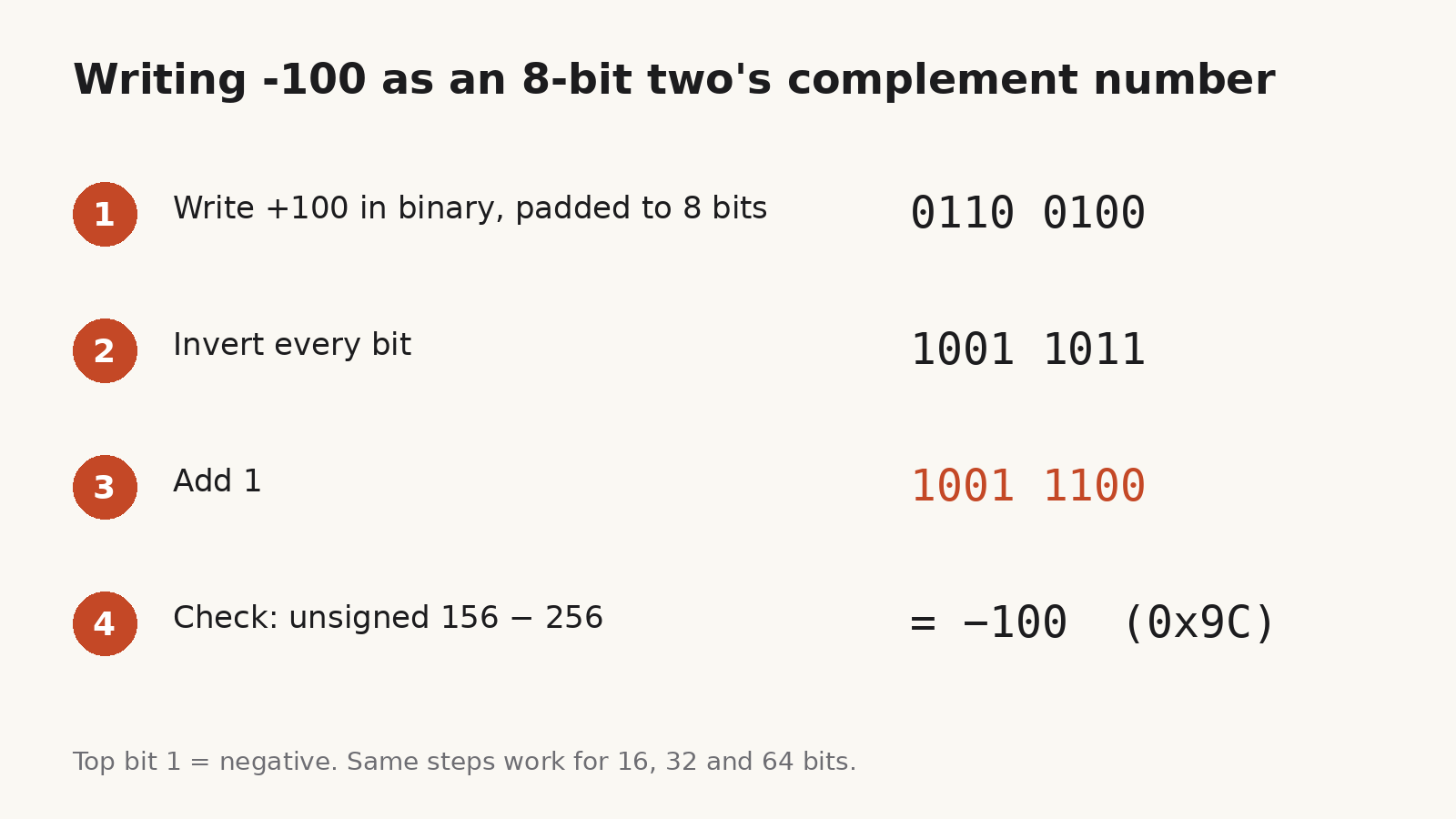
Take -100 in 8 bits.
- Choose the width. Two's complement only makes sense at a fixed width. Here it is 8 bits, so the valid range is -128 to 127 and -100 fits.
- Write the positive value, padded to the width. 100 = 64 + 32 + 4, so
0110 0100. - Invert every bit.
1001 1011. - Add 1.
1001 1100, which is0x9C. - Check it.
0x9Cis 156 unsigned, and 156 − 256 = -100.
There is also a shortcut that skips the addition. Start from the right of the positive value, copy every bit up to and including the first 1, then invert everything to its left. For 0110 0100, copy 100 and invert 01100 to 10011. The result is 1001 1100 again.
A second shortcut works when you have a calculator: the n-bit pattern for a negative number -x is 2ⁿ − x. In 8 bits, -100 is 256 − 100 = 156 = 0x9C. In 32 bits, -100 is 4,294,967,296 − 100 = 4,294,967,196 = 0xFFFFFF9C.
How to read a signed value in hex
Hex dumps, packet captures and debugger output rarely tell you whether a field is signed. If you know the width, the rule is simple:
- If the top hex digit is 0 to 7, the top bit is 0 and the signed value equals the unsigned value.
- If the top hex digit is 8 to F, the top bit is 1. Subtract 2ⁿ from the unsigned value.
A few examples:
| Pattern | Width | Unsigned | Signed |
|---|---|---|---|
0x7F |
8-bit | 127 | 127 |
0x80 |
8-bit | 128 | -128 |
0xFF |
8-bit | 255 | -1 |
0xFF9C |
16-bit | 65,436 | -100 |
0xFFFFFF9C |
32-bit | 4,294,967,196 | -100 |
0x0000009C |
32-bit | 156 | 156 |
The last two rows show why width matters. 0x9C is -100 as an 8-bit signed value, but if a log prints it as a 32-bit value with leading zeros, it is 156. Never guess the width from the number of digits you can see, because leading zeros are often dropped.
Sign extension: making a value wider without changing it
When a signed 8-bit value is copied into a 16-bit or 32-bit variable, the new high bits must be copies of the old top bit. That is sign extension.
0x9C(-100 in 8 bits) sign-extends to0xFF9Cin 16 bits and0xFFFFFF9Cin 32 bits. All three are -100.0x64(+100 in 8 bits) extends to0x0064and0x00000064.
If the high bits are filled with zeros instead (zero extension), 0x9C becomes 0x009C, which is +156. This is a classic bug when bytes are read from a file or a network buffer: the byte type is unsigned, the field is meant to be signed, and a temperature of -100 turns into 156.
Overflow: when the answer doesn't fit
Because the width is fixed, results that fall outside the range wrap around. In 8-bit signed arithmetic, 100 + 100 should be 200, but 200 is outside -128 to 127. The bits come out as 1100 1000, which reads as 200 − 256 = -56.
A quick test for signed overflow in addition: if two numbers with the same sign produce a result with the opposite sign, the result overflowed. Adding a positive and a negative number can never overflow.
Negating the most negative value is the other edge case. In 8 bits, -128 is 1000 0000. Invert it to 0111 1111, add 1, and you get 1000 0000 again. There is no +128 in 8 bits, so the negation of -128 is -128. The same happens with the minimum value at every width, and it is the reason abs() of the minimum integer can return a negative number in many languages.
Two's complement in JavaScript and Python
The idea is the same everywhere, but languages show it differently.
JavaScript numbers are floating-point, but the bitwise operators work on 32-bit signed integers:
~5is-6, because inverting the bits of x gives -x − 1.-5 >>> 0is4294967291, the unsigned 32-bit reading of the same bits. Use(-5 >>> 0).toString(16)to getfffffffb.-8 >> 1is-4(the sign bit is copied in), while-8 >>> 1is2147483644(zeros are shifted in).
Python integers have no fixed width, so bin(-5) prints -0b101, with a minus sign rather than a bit pattern. To see the two's complement bits, mask to the width you want: -5 & 0xFF gives 251 (0xFB). To go the other way, subtract 2ⁿ when the top bit is set: x - 256 if x & 0x80 else x.
In other languages, check the specification for how signed shifts and out-of-range conversions behave rather than relying on what one compiler does.
Checking values in the browser with BitLens
When you are reading a hex dump in a web page, a log viewer or documentation, converting by hand is easy to get wrong. BitLens is our free Chrome extension for this kind of work. It converts between decimal, hex, binary and octal as you type, shows signed two's complement readings for 8-, 16-, 32- and 64-bit widths, runs bitwise operations masked to the chosen width, and includes an IEEE 754 float view and ASCII/Unicode lookup. You can also highlight a number on a web page, right-click, and send it to BitLens.
BitLens is available for Chrome. You can add BitLens to Chrome from the Chrome Web Store.
Quick checklist
- Decide the width before anything else.
- To negate: invert all bits, add 1. Or compute 2ⁿ − x.
- To read: top bit 0 means positive; top bit 1 means subtract 2ⁿ.
- Widen signed values with sign extension, not zero extension.
- Watch for overflow when two same-sign numbers produce the opposite sign.
- Remember that the minimum value has no positive counterpart.
For more conversions, the binary, hex and octal cheat sheet covers base conversion and bitwise masks, and how to read an IEEE 754 float covers how floating-point numbers use their bits.