Short answer: Open the profile on soundcloud.com, find the profile picture's address (it starts with https://i1.sndcdn.com/avatars-), and replace the size part, such as -t500x500, with -original. If the .jpg address returns an error, try .png. The header banner is easier: the page already references it at its original size, in an address that starts with https://i1.sndcdn.com/visuals-.
Most "SoundCloud profile picture downloader" sites stop at 500 × 500 pixels. That's the copy a profile page uses for link previews, but it often isn't the largest copy SoundCloud keeps. This guide shows how to get the uploaded file, how to tell a real original from an enlarged copy, and what to keep in mind before you reuse someone's picture.

How SoundCloud stores profile pictures and banners
When someone uploads a profile picture, SoundCloud stores it and serves resized copies from its image server, i1.sndcdn.com. Each copy has the same address except for a size suffix just before the file extension. The examples below use a made-up ID:
https://i1.sndcdn.com/avatars-000123456789-abc123-large.jpg
The part after the last hyphen decides the size. These are the suffixes we requested for profile pictures on November 10, 2026, and what came back:
| Suffix | What you get |
|---|---|
-large |
100 × 100 (despite the name) |
-t300x300 |
300 × 300 |
-t500x500 |
500 × 500, the copy used in link previews |
-original |
the file as uploaded |
-t1080x1080, -t3000x3000 |
resized to that size, enlarged if the upload was smaller (the page's search-engine markup uses -t1080x1080) |
The header banner, which SoundCloud's page data calls a "visual", works the same way, with addresses that start with visuals-. Profile pages already reference the banner with the -original suffix, so you rarely need to change anything.
SoundCloud's help center asks for a square profile picture of at least 800 × 800 pixels and a header of at least 2480 × 520 pixels, both JPG or PNG and no larger than 2 MB. Older uploads can be much smaller.
Step by step: save a profile picture at its original size
1. Open the profile in a desktop browser
Go to the profile on soundcloud.com, for example soundcloud.com/artist-name. This works in Chrome, Firefox and other desktop browsers. The mobile app doesn't show image addresses.
2. Find the picture's address
The quickest way is the page source:
- Press Ctrl+U in Chrome or Firefox on Windows and Linux. On a Mac, press Cmd+Option+U in Chrome or Cmd+U in Firefox.
- Press Ctrl+F (Cmd+F on a Mac) and search for
og:image. - The
contentvalue is the profile picture's 500 × 500 address, ending in-t500x500.jpg.
You can also right-click the round profile picture and choose Inspect. Look for an address containing avatars- on the highlighted element or the one next to it, and copy it.
3. Swap the size suffix
Replace the size part and keep everything else:
https://i1.sndcdn.com/avatars-000123456789-abc123-t500x500.jpg
becomes
https://i1.sndcdn.com/avatars-000123456789-abc123-original.jpg
Paste the new address into the address bar and press Enter.
4. If you get an error, try PNG
The -original file keeps the format it was uploaded in. If the .jpg address returns an error, change the ending to .png. In our check, one older profile returned an error for -original.jpg and loaded fine as -original.png. If neither works, -t500x500 is the largest copy you can rely on.
5. Save it
Right-click the image and choose Save Image As. Name the file after the account so you can find it later.
Save the header banner
The banner is the wide image across the top of a profile.
- Open the page source as in step 2.
- Search for
visuals-. - Copy the first address you find. It ends in
-original.jpg, which is already the uploaded size. - Open it in a new tab and save it.
If a profile has no banner, SoundCloud shows a colour gradient based on the profile picture instead, and there's no banner image to save.
Check what you actually got
Always check the pixel size before you use the file. On Windows, right-click the file and choose Properties, then Details. On a Mac, select it in Finder and press Cmd+I.
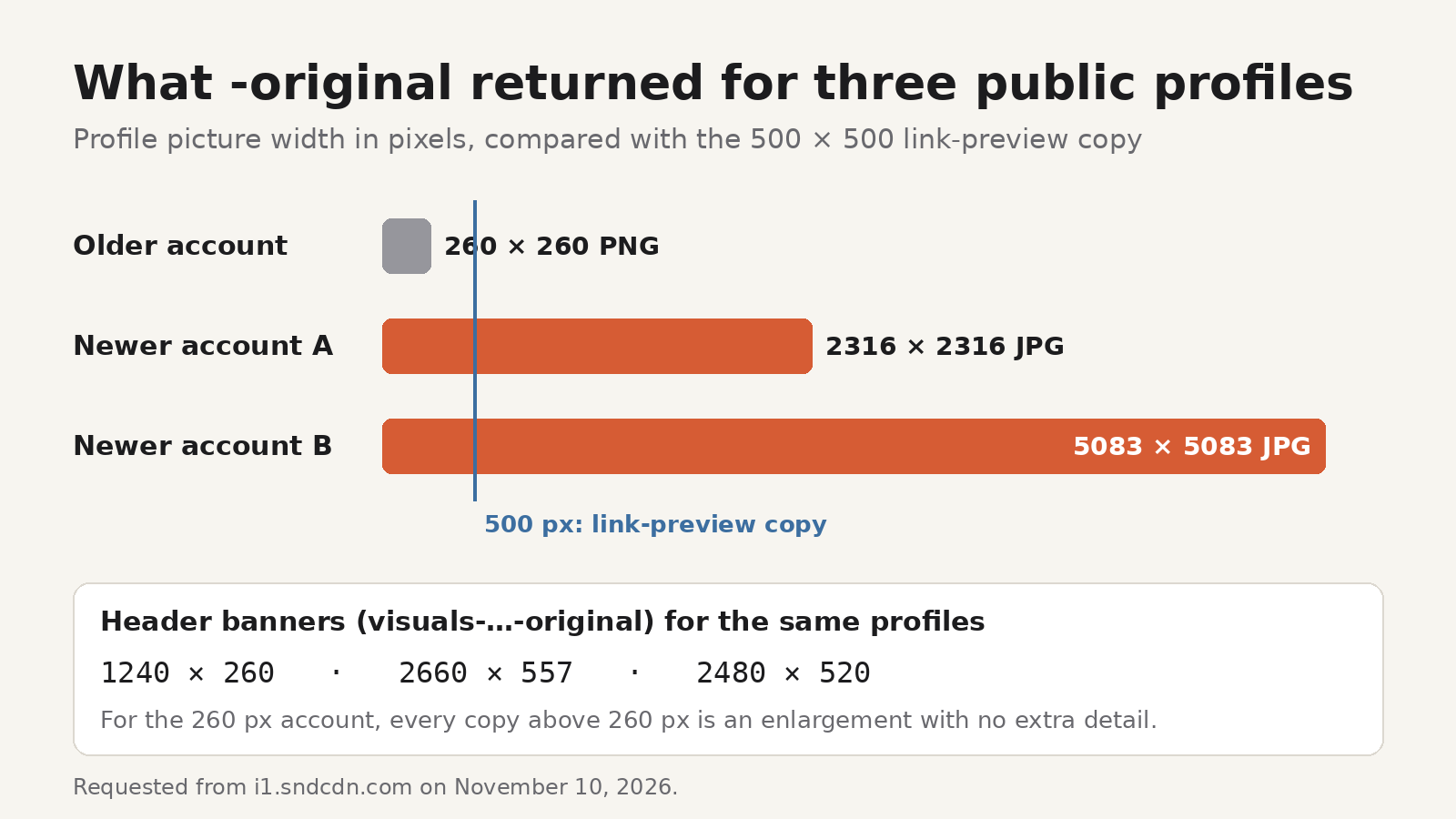
Here's why it matters. On November 10, 2026 we requested -original for the profile pictures of three public artist profiles:
- An older account returned a 260 × 260 PNG.
- Two newer accounts returned 2316 × 2316 and 5083 × 5083 pixel JPGs.
For the two newer accounts, the uploaded file was several times larger than the 500 × 500 link-preview copy. For the older account, the 500 × 500 copy was itself enlarged, and so was the 3000 × 3000 file that SoundCloud returned for the -t3000x3000 address. Those extra pixels weren't in the upload, so the larger file is no sharper.
The banners for the same three profiles were 1240 × 260, 2660 × 557 and 2480 × 520 pixels.
A simple rule: request -original first, note its size, and treat anything larger as an enlargement. If a website promises "HD" or "4K" SoundCloud profile pictures, the most real detail it can give you is what the account owner uploaded.
Track covers work the same way
Track and playlist artwork uses the same address pattern, with artworks- instead of avatars-. For the details, including where to find a track's artwork address, see how to download SoundCloud cover art in full size.
If you save SoundCloud tracks regularly, SoundCloud Enhanced Pro, a Chrome and Firefox extension made by UnifyBrowse, the publisher of this blog, handles the cover for you. Its Download Artwork button saves a track's cover as a separate 500 × 500 JPG named after the track, and if a track has no cover it saves the uploader's profile picture instead. It doesn't fetch -original files, so use the steps above when you need the uploaded size. For tracks whose uploader has enabled downloads, the extension can also add the cover and title, artist, album and genre tags to the saved file when artwork is available. MP3 at 192 kbps is free for everyone, and Pro adds 256 and 320 kbps. See pricing for what each plan includes. SoundCloud Enhanced Pro is an independent extension by UnifyBrowse and is not affiliated with or endorsed by SoundCloud.
Respect the person in the picture
A profile picture is often a photo of a real person, or an artist's logo. Saving one to look at, or to fill in your own music library, is different from reusing it. Don't use someone else's picture as your own avatar, and don't put it on flyers, thumbnails, merchandise or reposts without permission from the account owner or rights holder. Credit and link to the profile when you share it. This guide explains a technique; it isn't legal advice.
FAQ
What size is a SoundCloud profile picture?
The profile page shows small copies, and its link preview uses a 500 × 500 copy. The stored original is whatever the account owner uploaded. SoundCloud asks for at least 800 × 800 pixels, but older uploads can be smaller. In our check, the originals ranged from 260 × 260 to 5083 × 5083.
Why do I get an error when I open the -original address?
The original may have been uploaded as a PNG. Change .jpg to .png at the end of the address. If both fail, save the -t500x500 copy.
Can I download a SoundCloud banner in full size?
Yes. Search the profile's page source for visuals-. That address already ends in -original and gives you the banner at its uploaded size. SoundCloud asks for headers of at least 2480 × 520 pixels.
Is the 500 × 500 copy good enough?
For a small avatar in a contact list or a note to yourself, yes. For anything printed or shown large, open -original first and compare the sizes.