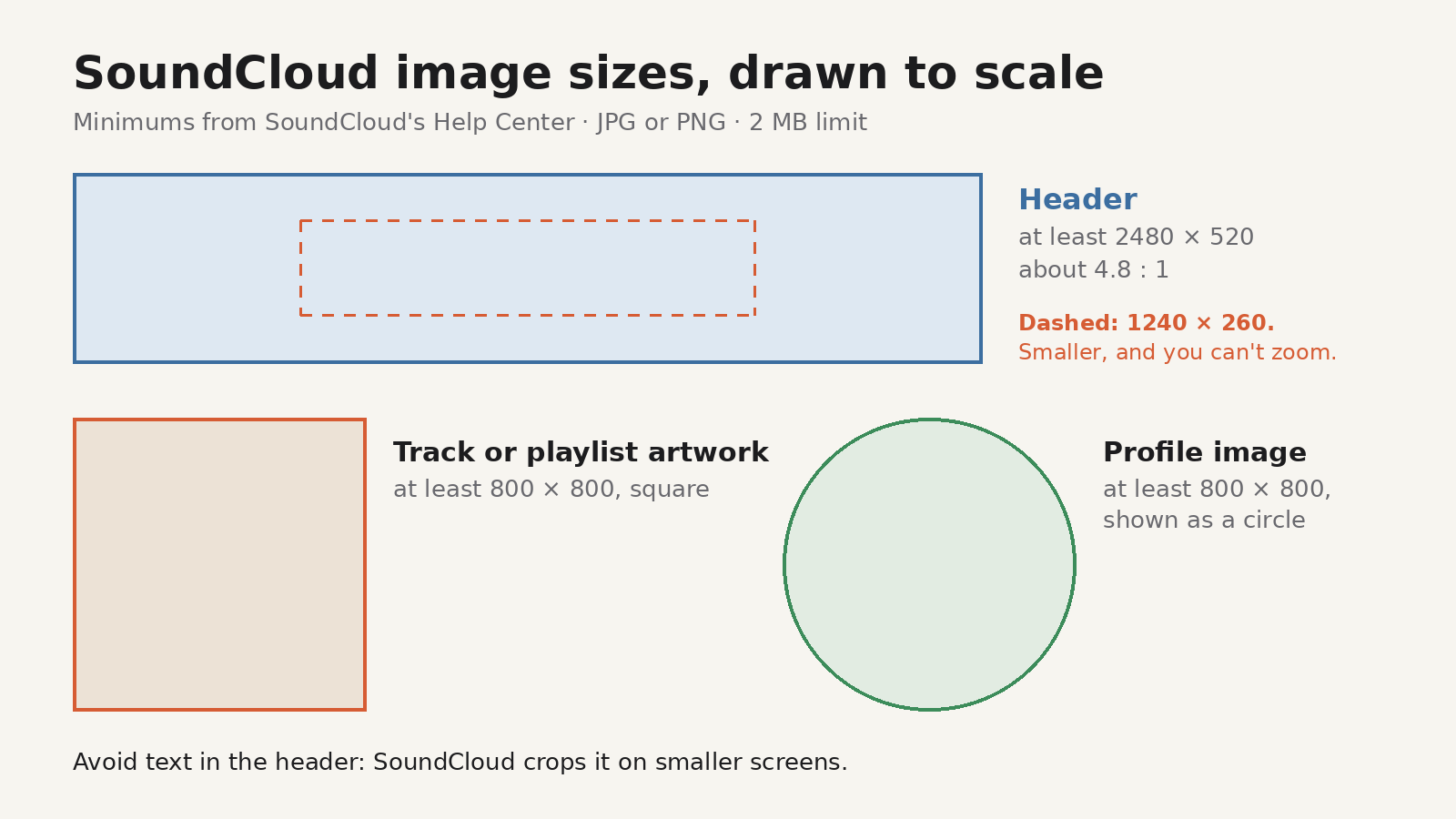
Short answer: SoundCloud asks for a header (banner) image of at least 2480 × 520 pixels, as a JPG or PNG, with a 2 MB limit. Profile images and track or playlist artwork should be square and at least 800 × 800 pixels, also under 2 MB. Keep text out of the header, because SoundCloud crops it on smaller screens.
The header is the wide strip across the top of your SoundCloud profile. It's the first thing a visitor sees, and its shape is unusual: about 4.8 times wider than it is tall. Most photos and designs aren't that shape, so they get cropped in ways you didn't plan. This guide gives the official sizes, then shows how to turn any image into a header that fits.
SoundCloud image sizes at a glance
All figures come from SoundCloud's Help Center articles on profile images and headers, editing tracks and playlists.
| Image | Size | Shape | File |
|---|---|---|---|
| Profile header (banner) | At least 2480 × 520 px | About 4.8 : 1 | JPG or PNG, 2 MB limit |
| Profile image | At least 800 × 800 px | Square, shown as a circle | JPG or PNG recommended, 2 MB or less |
| Track artwork | At least 800 × 800 px | Square | JPG or PNG, under 2 MB |
| Playlist artwork | At least 800 × 800 px recommended | Square looks best | Up to 2 MB |
A few details from the same help pages are worth knowing:
- The 1240 × 260 threshold. After you choose a header image, SoundCloud lets you drag it up and down and zoom. If you can't zoom, your image is smaller than 1240 × 260 pixels, which is exactly half the recommended size.
- No text in the header. SoundCloud says text in the header will be cropped on smaller screens.
- Playlist artwork is separate. Changing a playlist's artwork doesn't change the artwork of the tracks inside it.
Why the header is tricky
At 2480 × 520, the header's shape is roughly 4.8 : 1. For comparison, a typical phone photo is 4 : 3 and a video frame is 16 : 9. If you upload a 4 : 3 photo, most of its height has to go.
SoundCloud also shows the header at different widths on different screens, and on narrow screens part of it is cut off. So the safest designs:
- Put the subject, or anything that must be seen, near the middle.
- Treat the left and right edges as space that may disappear.
- Use texture, colour, a crowd shot or a stage photo rather than a carefully placed logo or a line of text.
How to make a header from any photo
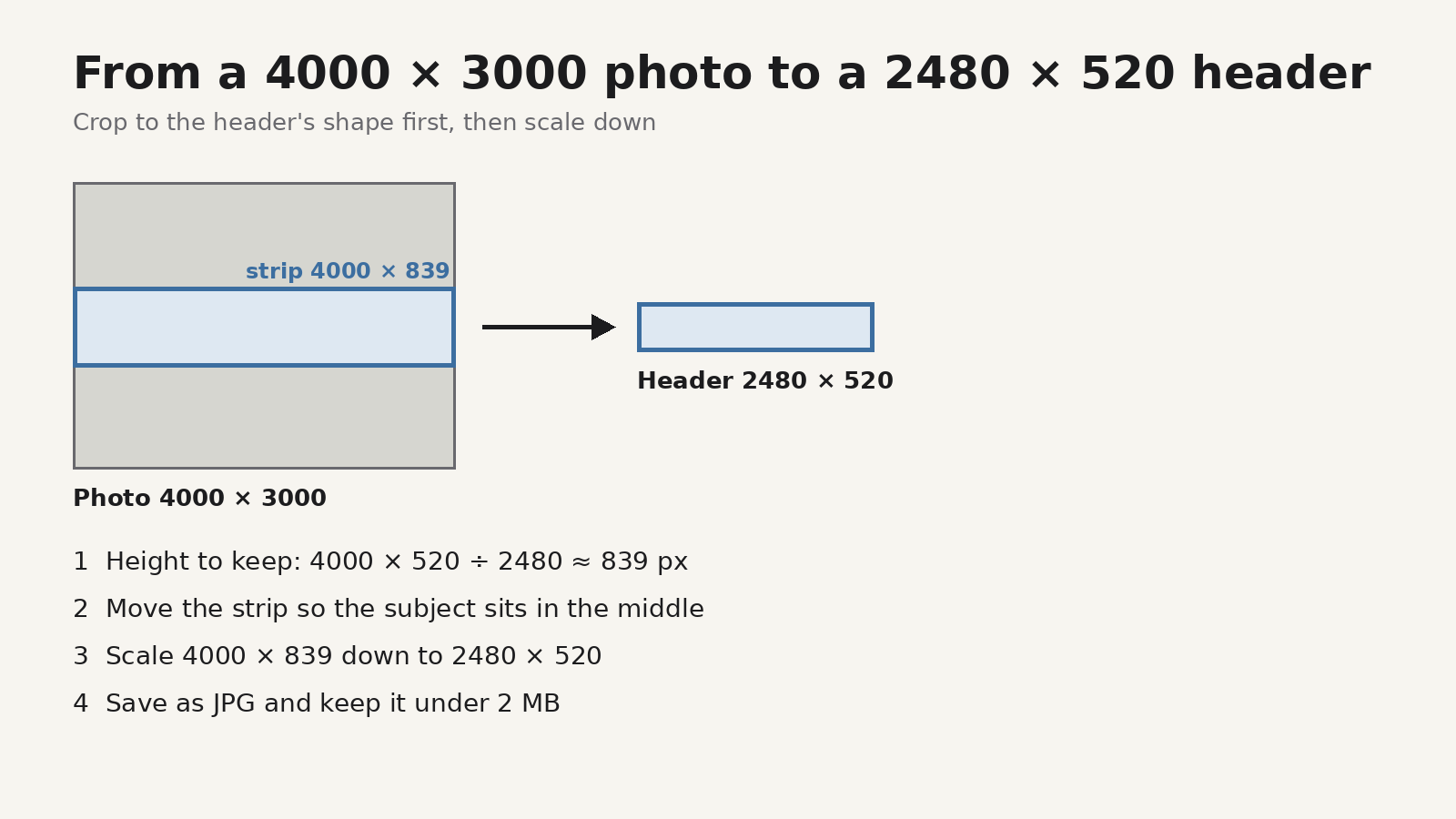
The trick is to crop to the header's shape first, then scale down. Here's the arithmetic for a common 4000 × 3000 photo:
- Work out the strip to keep. Keep the full width, and find the height that matches the header's shape: 4000 × 520 ÷ 2480 ≈ 839 pixels. So you keep a strip 4000 × 839 pixels.
- Place the strip. Slide it up or down so the part you care about sits inside it, ideally near the centre.
- Scale it down. Resize the 4000 × 839 strip to 2480 × 520. Because you cropped to the right shape first, nothing stretches.
- Save and check the size. Save as JPG and make sure the file is under 2 MB. Open it at 100% and check the edges and any fine detail.
For a different source size, the same formula works: height to keep = source width × 520 ÷ 2480. A 6000-pixel-wide photo gives a strip about 1,258 pixels tall.
What if your image is narrower than 2480 pixels?
If your source is, say, 1920 pixels wide, you'd have to enlarge it to reach 2480. Enlarging adds pixels but not detail, so the result can look soft. It will still upload, and anything above 1240 × 260 keeps the zoom control, but a wider source gives a sharper header. If you're designing from scratch, start the canvas at 2480 × 520 or a larger size with the same shape, such as 4960 × 1040.
JPG or PNG?
Both are accepted. For photos, JPG usually keeps the file well under 2 MB at good quality. A detailed photo saved as PNG at full header size can go over the limit: 2480 × 520 is about 1.3 million pixels, or around 3.9 MB before compression. PNG makes sense for flat graphics with few colours.
Profile image and artwork
The square images are simpler:
- Profile image: crop to a square, at least 800 × 800. SoundCloud shows it as a circle, so keep faces and logos away from the corners.
- Track and playlist artwork: square, at least 800 × 800. SoundCloud's tip is that high-contrast, simple designs stand out best in a crowded feed. Artwork is shown small in many places, so make sure it still reads at thumbnail size.
If you're trying to save an existing profile picture or banner from SoundCloud rather than make a new one, see our guide to downloading a SoundCloud profile picture or banner.
Doing it in your browser with Image Resizer
Image Resizer is a browser extension for Chrome and Firefox, made by UnifyBrowse, that resizes, converts and compresses images in the browser. It has no SoundCloud preset, but its custom size and crop controls cover the steps above:
- Custom dimensions up to 16000 × 16000 pixels, so you can enter 2480 × 520 for a header or 800 × 800 for artwork.
- Stretch, Fit and Crop modes, with a focal-point control so you can aim the crop at the subject instead of the centre.
- Aim for a file size: enter a limit and the extension lowers the quality to try to reach it. The target isn't guaranteed, so check the final file size.
- Convert between JPG, PNG and WebP. It also reads HEIC and BMP.
- Save up to 3 reusable profiles, for example one for "SoundCloud header 2480 × 520" and one for "Artwork 800 × 800".
- Get images in several ways: drag one in, paste from the clipboard, or right-click an image on a web page and choose Resize this image, then open Image Resizer from the browser toolbar.
The Free plan processes up to 5 images per run and downloads them one by one or as a single ZIP. Pro, a one-time €7.99 purchase, removes the 5-image limit, keeps up to 20 profiles, adds multi-preset export packs and activates on multiple browsers. The pricing page has the details, and the 1.0.0 release notes explain which features use the network, such as Pro license checks.
FAQ
What is the SoundCloud banner size?
SoundCloud recommends a header image of at least 2480 × 520 pixels, as a JPG or PNG, with a 2 MB limit.
What size is a SoundCloud profile picture?
Square and at least 800 × 800 pixels, 2 MB or less. It's displayed as a circle.
What size is SoundCloud track artwork?
At least 800 × 800 pixels, square, as a JPG or PNG under 2 MB.
Why can't I zoom my SoundCloud header?
According to SoundCloud, zoom isn't available when the image is smaller than 1240 × 260 pixels. Use a larger image.
Why does my banner look cropped on my phone?
SoundCloud crops the header on smaller screens. Keep important content near the middle and avoid text.
Can I change my header from the SoundCloud app?
SoundCloud's help page lists steps for the iOS and Android apps, but the same page also says image uploads can currently only be done through the main SoundCloud website, not the mobile site or app. If the app doesn't work for you, upload from the website on a computer, using a JPG or PNG under 2 MB.