Short answer: A link is only an address. The page behind it can be deleted, edited or handed to someone else, and the link won't tell you. If something matters to you, keep a copy of the content, not just the URL. For pages that are already gone, try a web archive such as the Wayback Machine.
Over the weekend of November 14–15, 2026, people on X noticed that links in old posts were opening things their authors never shared. Old posts on Donald Trump's account, some dating back to 2011, suddenly pointed to memes, videos and other unrelated pages. One post about it had passed 40,000 views within a few hours. How it was done this time hasn't been confirmed, but the posts people shared used Bitly short links. A similar wave in early 2025 came from a bug that let people claim old custom Bitly links. Bitly said on January 30, 2025 that a code fix had solved the issue.
It's a funny story, but it shows a problem that affects everyone who saves links: what a link points to can change long after you saved it.
Three ways a saved link fails
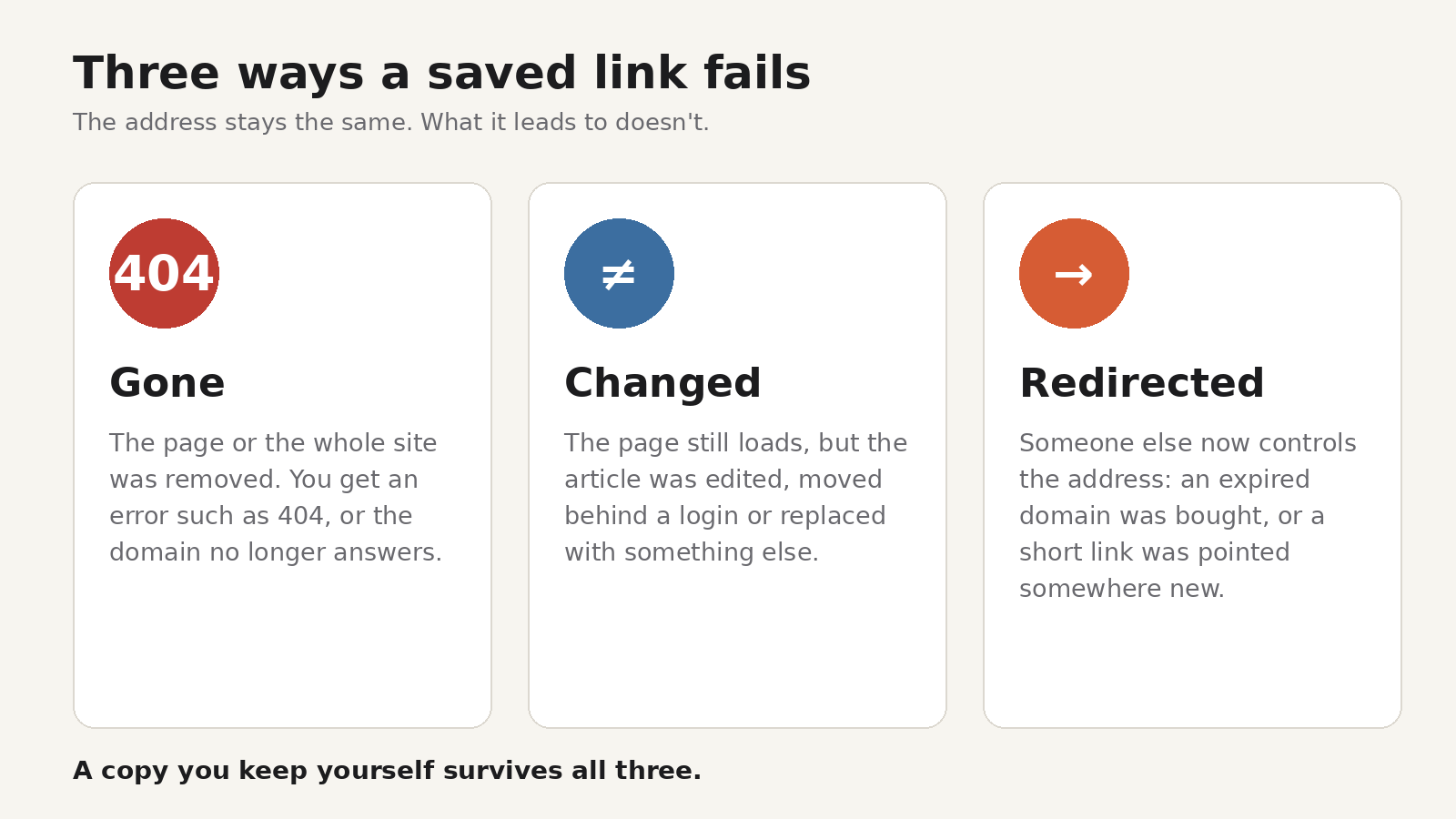
- Gone. The page was deleted, the site was rebuilt with new addresses, or the whole domain expired. You get an error such as 404, or nothing loads at all.
- Changed. The address still works, but the content is different. An article was updated, moved behind a login, or replaced with something else. This is sometimes called content drift, and it's harder to notice than a dead link.
- Redirected. Someone else now controls the address. An expired domain can be bought by anyone, and a short link can be pointed at a new destination by whoever controls it. The old link then leads wherever the new owner wants.
The third case is the one that can hurt you. A dead link is a dead end. A taken-over link can lead to a scam page or a malicious download that looks like it came from a source you trusted.
How common is it?
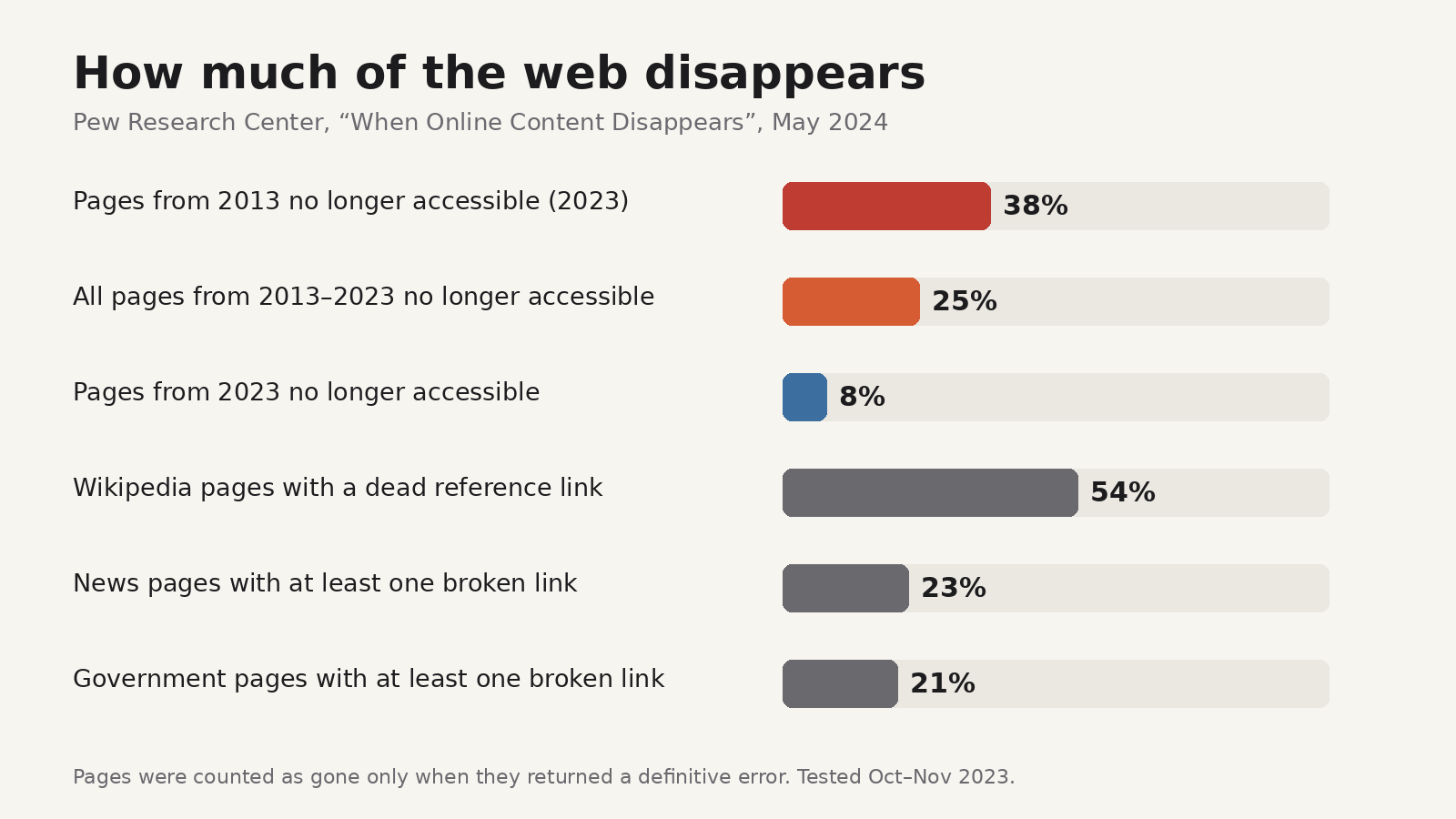
More common than most people expect. In May 2024, Pew Research Center published a study of link rot. It checked a sample of just under 1 million web pages collected between 2013 and 2023, tested in late 2023, and the links on separate samples of news, government and Wikipedia pages:
- 38% of pages that existed in 2013 were no longer accessible.
- A quarter of all pages from the whole 2013 to 2023 period were gone.
- Even 8% of pages from 2023 had already disappeared.
- 23% of news pages and 21% of government pages had at least one broken link.
- 54% of Wikipedia pages had at least one dead link in their references.
Pew counted a page as gone only when its domain no longer resolved or the server returned one of a short list of error codes, such as 404 Not Found or 410 Gone. Pages whose content had changed weren't counted, so the real share of links that no longer show what you saved is likely higher.
Before you click an old link
A few habits help, especially with links in old posts, emails and documents:
- See where it really goes. On a computer, hover over the link and read the address in the corner of the browser before clicking. On a phone, press and hold the link to see the address. For short links, the destination isn't visible until you open it, so be more careful with them.
- Check the domain, not just the page title. A link that used to go to a known site but now lands on an unfamiliar domain has probably changed hands.
- Don't download or sign in from an old link. If you need a file or an account page, go to the site directly by typing its address or using a bookmark you made yourself.
- Be wary of link previews. The preview card under a social post can update when the destination changes, so it isn't proof that the link is still what it was.
How to find a page that's gone
If a link is dead or now shows something else, the original may still exist in an archive:
- Try the Wayback Machine. Paste the old address into web.archive.org and pick a snapshot from around the date you saved it. Coverage is good for popular pages and patchy for small ones.
- Search for the exact title. Articles are often republished or moved to a new address on the same site. Put the title in quotes in a search engine.
- Check the site's own search or archive pages. A rebuilt site may still have the content under a new URL.
- Ask the author. For a blog post or a paper, the writer may have a copy or a new link.
None of these is guaranteed. Archives only have what someone captured, and some sites ask archives not to keep copies.
How to keep what you save
The fix is to stop relying on the link alone. For anything you expect to need again, keep the content itself:
- Save a file. In Chrome or Firefox, print the page to PDF or use Save Page As. It's reliable and works anywhere, but files pile up in a downloads folder and aren't easy to search later.
- Ask an archive to capture it. The Wayback Machine's Save Page Now creates a public snapshot you can come back to. Don't use it for anything private, because the snapshot is public.
- Use a read-later tool that stores a copy. Some read-later apps save a readable copy of the article text along with the link, so you can still read it if the page later changes or disappears. Check whether the tool you use stores the text or only the address.
- Write down why you saved it. A one-line note ("the pricing table from March") helps you notice later when a page no longer shows what it did.
For links you publish yourself, such as in a newsletter or on your site, prefer full addresses over shortened ones when the link needs to last, and keep any domain you've linked to renewed.
Our guide to saving web pages for offline reading compares these methods side by side.
Keeping copies with Cairn
Cairn is our free read-later extension for Chrome and Firefox. When you save an article, it captures a clean readable copy of the article text alongside the link (when it can detect the article on the page), so the words you saved stay in your library even if the page later changes or disappears. The readable copy is meant for reading, not a pixel-perfect snapshot of the original page.
You can also save pages, selected text, images and links, sort them with collections, tags and notes, highlight saved articles, and search across titles, URLs, notes, tags and article text. There's no account to create: your library stays in your browser, and you can export everything to JSON. Two limits to know: the library lives in the browser profile where you saved it, with no sync yet (Cairn mobile and desktop apps are coming soon), and Cairn sends usage data by default, tied to a random install ID.
If you're looking at other read-later apps, our Pocket alternatives guide compares several by how you read.
FAQ
What is link rot?
Link rot is when links stop leading to the content they originally pointed to, because the page was removed, moved or changed, or the domain expired.
Can someone change where an old short link goes?
Whoever controls a short link can usually change its destination, and in the past bugs have let other people claim old links. Treat short links in old posts with extra care.
Is the Wayback Machine a reliable backup?
It's very useful, but it only has pages someone captured, and coverage of smaller sites is uneven. For anything important, keep your own copy too.
Does saving a link in my browser bookmarks keep the page?
No. A bookmark stores the address and title only. If the page changes or disappears, the bookmark still opens the same address and shows whatever is there now.
Is a PDF better than a read-later copy?
A PDF keeps the layout and works anywhere, but it's harder to search and organise. A read-later copy is easier to find and read later, but keeps the text rather than the exact look of the page. Many people use both for different things.