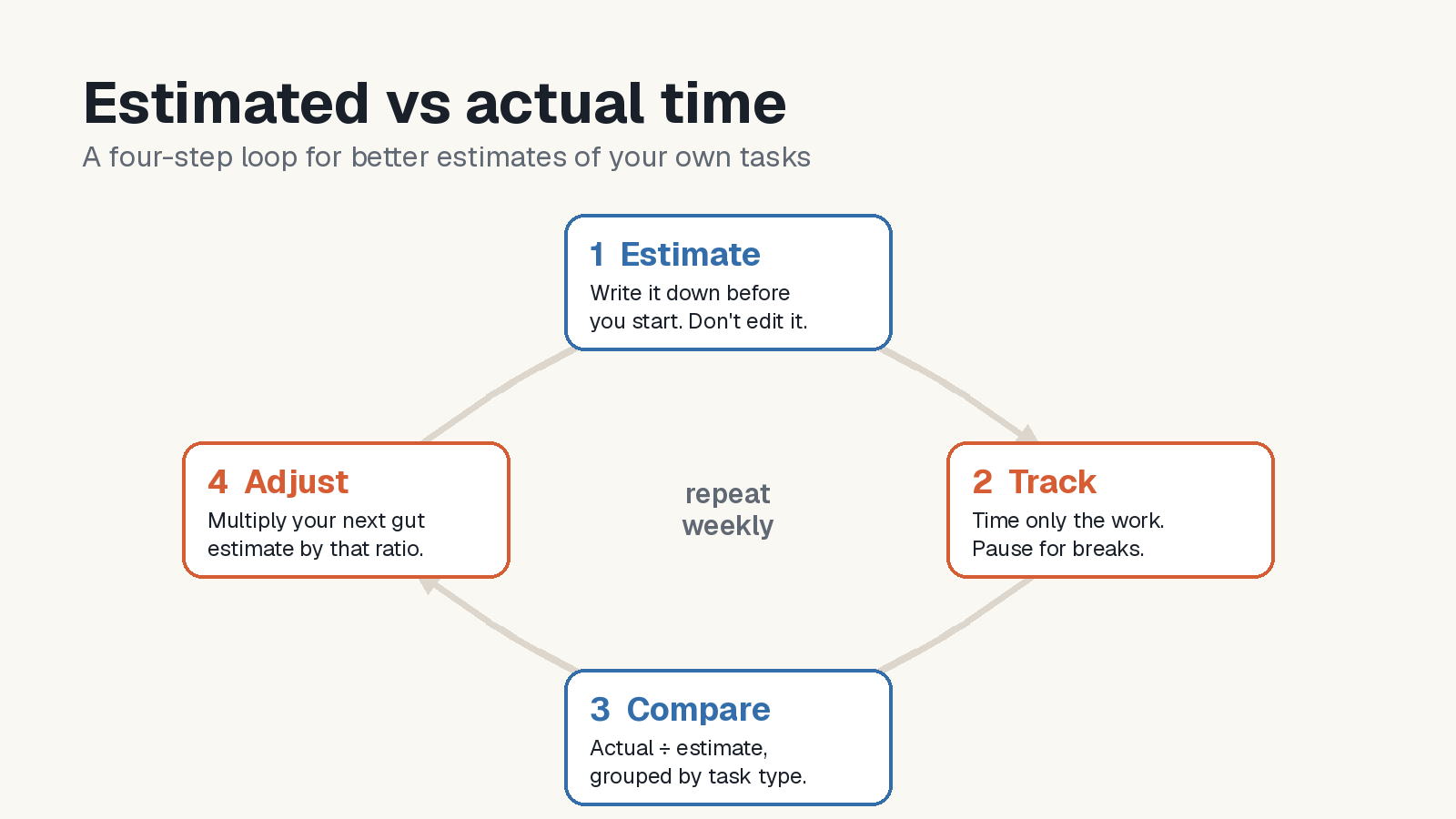
Short answer: write down how long you expect a task to take before you start, time only the minutes you actually spend on it, and record both numbers when you finish. For each kind of task, divide total actual work time by total estimated work time. Treat the early ratios as provisional: use a ratio to inform your next estimate, then compare the result with what happens on comparable tasks.
You don't need a project management system for this. A notebook works. A task app with a timer per task makes it easier, because the tracking happens where the task already is.
Why your gut estimate is usually too short
Psychologists call it the planning fallacy: people predict that their own tasks will take less time than they do, even when they know similar tasks ran late before.
In Study 1 of a 1994 paper, final-semester psychology students predicted when they would submit their honours thesis. Their best guesses averaged 33.9 days from the survey, while actual completion averaged 55.5 days among the 33 students with recorded completion dates. The paper reports that 29.7% finished by their own best-guess date, not a formal course deadline. These are elapsed days until submission, not hours spent working. See p. 369 and Table 1 of Buehler, R., Griffin, D., & Ross, M. (1994), “Exploring the planning fallacy: Why people underestimate their task completion times,” Journal of Personality and Social Psychology, 67(3), 366–381. DOI: 10.1037/0022-3514.67.3.366.
In Study 4, participants in the “recall-relevant” condition first summarized past performance on similar assignments, calculated when the new assignment would finish at that typical timing, and described a plausible scenario leading to it before making a prediction. This group no longer showed statistically significant average optimistic bias. Simply recalling past work did not have that effect, and absolute prediction error did not improve (pp. 374–376).
The workflow below is a practical way to use your own records. The paper did not test this active-work-time ratio method.
Step 1: Write the estimate down before you start
Put a number on the task before any work begins: "45 minutes", "1h30". Use one unit, and estimate the work itself, not the calendar time. "Write the report" might take two hours of work spread over three days.
Two rules make the data worth having:
- Estimate first, every time. An estimate added after the work is done isn't an estimate.
- Don't edit it later. If the task grows, say a reviewer asks for a new section, note that as new scope rather than quietly raising the original number. Otherwise every task looks well estimated and you learn nothing.
Step 2: Track only the time you actually work
The tracked number should be time spent working on the task. That means:
- Pause for breaks and interruptions. A lunch break left running on the timer makes every task look underestimated.
- Keep waiting time out. Time a task sits waiting for someone else's reply is real, but it isn't work time. If waiting is what makes things late for you, note it separately.
- Note gaps in tracking. If you forget to start the timer, mark the entry as incomplete. Missing minutes can bias the comparison, especially for short tasks.
A stopwatch or a Pomodoro timer can support the log, provided you record only active work time and exclude breaks. Use the same definition for estimates and actuals.
Step 3: Record both numbers when you finish
When you mark a task done, write down three things: the kind of task, the estimate and the tracked time. "Writing, 60, 95" is enough.
The kind of task matters because people are rarely uniformly optimistic. You might be accurate on code reviews and wildly off on anything involving writing or phone calls. Keep the categories broad. Four or five types are plenty.
Step 4: Work out your ratio per task type
For each task type, divide total tracked work minutes by total estimated work minutes. This is an estimate-weighted average of the individual task ratios: a task with a tiny estimate does not receive the same weight as a larger one. It can still be affected by outliers. Use positive estimates; review zero estimates, missing timer data and changed scope separately.
Here is an example with illustrative numbers:
| Task type | Estimates (min) | Tracked (min) | Ratio |
|---|---|---|---|
| Writing | 60 + 45 = 105 | 95 + 70 = 165 | 165 ÷ 105 ≈ 1.6 |
| Code review | 30 + 20 = 50 | 33 + 24 = 57 | 57 ÷ 50 ≈ 1.1 |
| Admin | 15 + 20 = 35 | 21 + 26 = 47 | 47 ÷ 35 ≈ 1.3 |
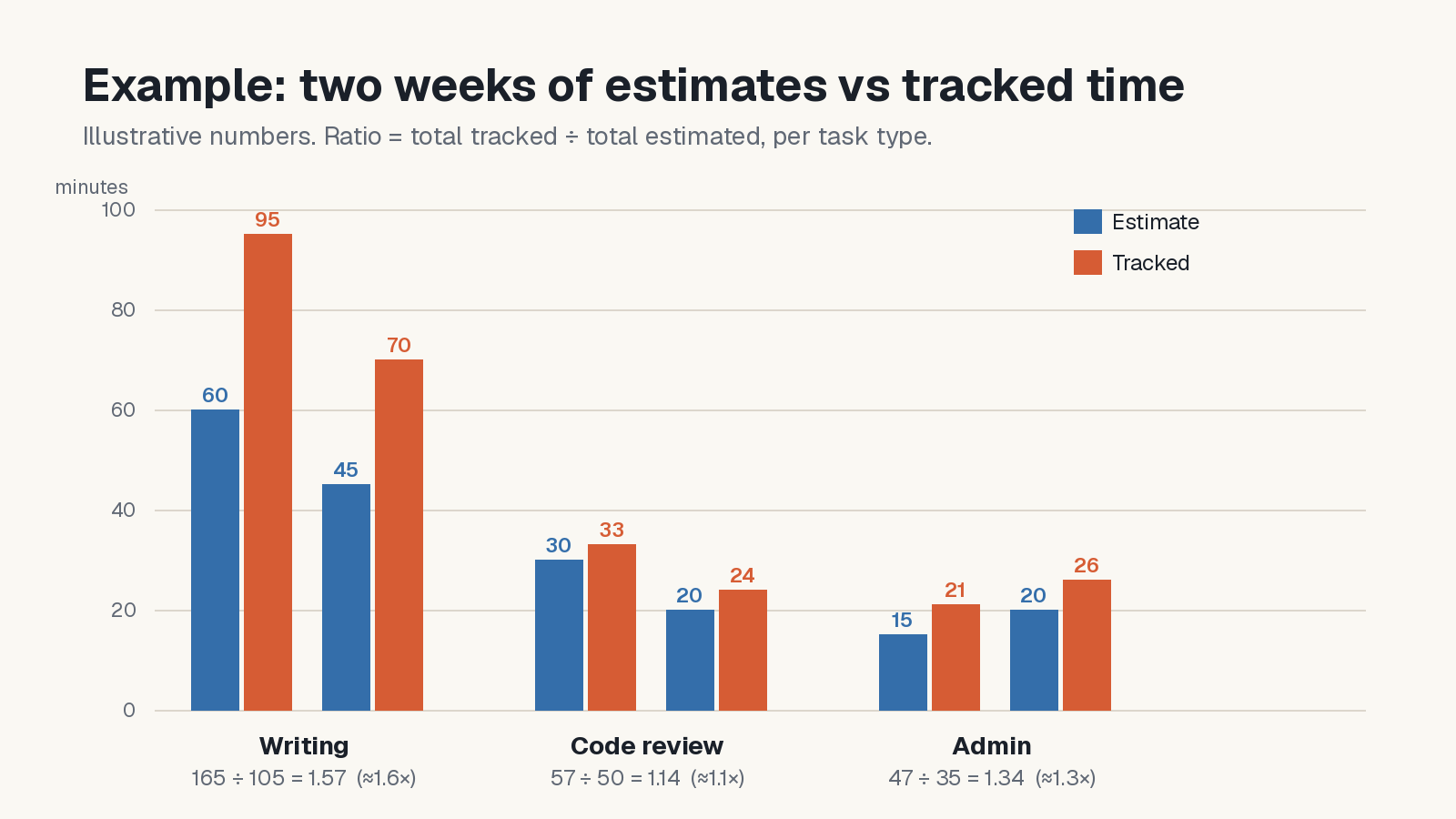
In this example, writing takes about 60% longer than planned, code review is close, and admin runs about a third over. A ratio above 1 indicates observed underestimation for those tasks; below 1 indicates observed overestimation, not necessarily deliberate padding.
Two tasks per type are only a starting example. Treat the first ratios as provisional and collect more comparable tasks. Stability depends on variation and changes in scope, not a fixed number of completed tasks.
Step 5: Adjust your next estimate, then repeat
Using the rounded writing ratio of 1.6, a 40-minute estimate becomes 40 × 1.6 = 64 minutes. That could be a roughly 65-minute planning block rather than rounding back down to an hour. Using the unrounded ratio would give about 63 minutes. Neither figure guarantees how long the next task will take.
Then keep the loop going:
- Review regularly. A weekly check is one option: update the ratios and look at the two or three biggest misses.
- Look for patterns as well as single misses. A task that ran long because the internet went down may reveal a one-off dependency. Repeated overruns on comparable writing tasks may point to a broader estimating pattern.
- Change one thing at a time. If small tasks keep running over, the cause is often fixed overhead such as opening files, finding context or replying to messages. You could set a minimum estimate for any task, or batch small ones together.
Common mistakes
- Tracking only the tasks that went badly. You'll overcorrect. Log every task in a category, including the ones that went to plan.
- Counting breaks as work. Pause the timer, or your ratio will be inflated.
- Re-estimating after the fact. Freeze the first number.
- Using one ratio for everything. A single average hides the task types where you're most off.
- Chasing perfect accuracy. The goal is a plan you can mostly keep. If your days end roughly where you expected, the method is working.
Doing it in Todofy
Todofy is our task and calendar app for Windows, macOS and Linux. Its product page lists task estimates, a per-task stopwatch and a Pomodoro timer. Record the estimate and tracked minutes for comparison; the ratio calculation in this guide is manual, not a described in-app report.
- Add an estimate to the task. Use a consistent unit for the comparisons you record.
- Use a timer while you work. Todofy includes a per-task stopwatch and a Pomodoro timer.
- Pause for breaks. The timers support start, pause and stop, and keep running while the app is in the system tray.
- Watch for an overrun. The task row and tray show a live warning when tracked time exceeds the estimate.
- Record your comparison. Write down the estimate and tracked minutes while the figures are visible. Todofy includes a Markdown journal with day summaries; you can keep a note there and calculate the ratios separately.
Todofy stores tasks in a local SQLite database on your computer. You can use its local features without an account or internet connection. Account sync and a one-way push of eligible dated tasks to Google Calendar are optional; enabling them sends the selected content to the relevant service.
You can download Todofy for macOS, Windows or Linux from the Todofy product page. The page lists a SHA-256 checksum for every download; our guide on how to verify a SHA-256 checksum shows how to check yours before you install.
FAQ
How accurate should my estimates be?
There's no universal target. For personal planning, aim for ratios that stay roughly steady from week to week. A steady 1.4 is more useful than a ratio that swings between 0.8 and 2.5, because you can plan around a predictable error.
Should I just add a buffer to every estimate?
A flat buffer helps, but it treats every task the same. A ratio per task type puts extra time where you actually need it and keeps you from padding tasks you already estimate well.
Is a Pomodoro timer or a stopwatch better for tracking?
Either can record work time if breaks are excluded. A stopwatch suits sessions that vary in length; Pomodoro uses timed work blocks and breaks. Choose the format you prefer and make sure the recorded minutes are assigned to the right task.
Do I need an app for this?
No. A notebook with three columns (type, estimate, actual) and a phone timer is enough to start. An app helps mainly because the timer, the estimate and the task live in one place, so you're less likely to skip a step.
How long until the ratios are useful?
There is no fixed waiting period or task count. Keep the early ratios provisional and look for stability across repeated, comparable tasks before relying on them for planning.