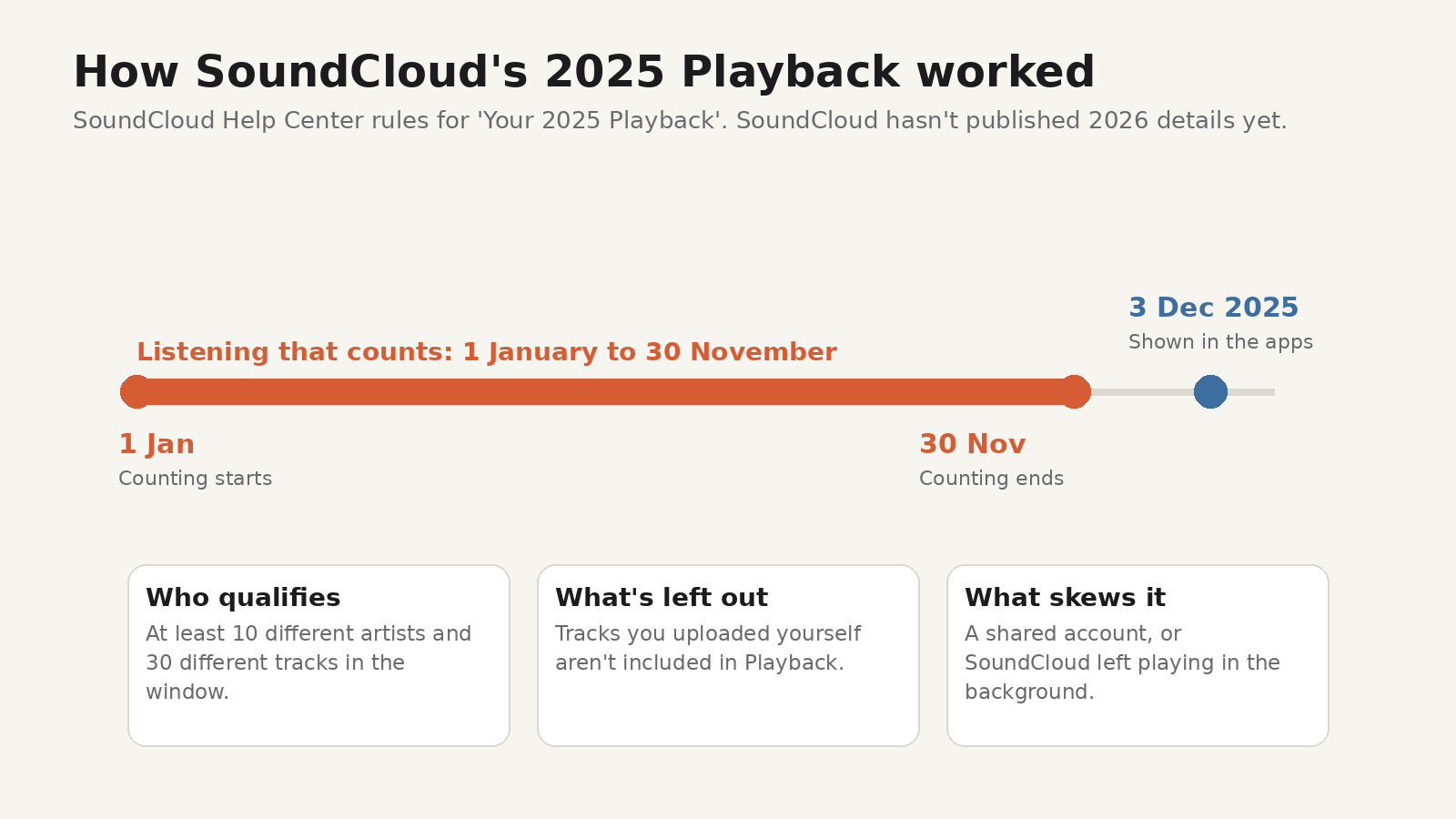
Short answer: SoundCloud's version of Spotify Wrapped is called Your Playback. Last year, SoundCloud counted listening from 1 January to 30 November and showed "Your 2025 Playback" in its apps from 3 December 2025, to anyone who had played at least 10 different artists and 30 different tracks. SoundCloud hasn't published the 2026 details yet, so if it keeps last year's rules, the next week of listening still counts. Playback is a good top-5 snapshot, but it isn't your whole year. Below: how it works, what skews it, and how to put together a fuller recap from your likes, playlists and history.
Why everyone's talking about recaps this week
Spotify Wrapped is the annual ritual that turns a year of listening into shareable slides, and the countdown is already all over social media. Spotify hasn't announced a 2026 date. Fans expect early December based on previous years, when Wrapped arrived on a Wednesday soon after US Thanksgiving.
If most of your listening happens on SoundCloud, Wrapped won't tell you much. SoundCloud runs its own recap, and the rules are a little different.
How SoundCloud Playback works
Everything in this section comes from SoundCloud's Your Playback playlists help page, which still describes the 2025 edition.
What it is. "Your 2025 Playback" was a look back at the songs, artists and genres you played that year. It came in two parts: an interactive stories feature with your highlights, and the classic "Your Playback" playlist of the tracks you played most.
The counting window. For 2019 to 2025, Playback counted listening from 1 January to 30 November. Anything you played in December went into the following year's picture, or nowhere.
Who qualifies. You needed an account and at least 10 different artists and 30 different tracks in that window. SoundCloud also says the recap needs enough songs, artists, moods and genres to fill each list of five, which is "usually only around 20-50 songs".
When it appeared. Eligible users on iOS and Android saw it on their home page from 3 December 2025, and only on the latest app version. If you don't see it, update the app first.
How the playlist is ordered. By play count, most played first.
What's left out. Tracks you uploaded yourself aren't included.
Keeping it. Tap the heart on your Playback playlist to save it to your Library. Go and Go+ subscribers can also save it for offline listening. If you're not sure which plan you have, our guide to what every SoundCloud plan costs lays them out.
Before 30 November: what can skew your Playback
SoundCloud lists two reasons a Playback playlist can include music you didn't listen to:
- You share an account. If a partner, sibling or flatmate uses your login, their listening is in your numbers.
- SoundCloud keeps playing in the background. Autoplay after a set ends, or a tab you forgot about, still counts as plays.
If last year's window holds, there's about a week left in this year's. That's not enough time to rewrite your year, and there's no point gaming a recap that's meant for you. But if you share an account, it's a good moment to set up separate logins so next year's Playback is actually yours.
You can also look back further. The same help page links to every Playback playlist from 2016 to 2025, which makes a fun comparison: which artists have stayed with you for years, and which were a phase?
What Playback doesn't show
Playback is built around your top five songs, artists, moods and genres plus a playlist of your most-played tracks. That leaves gaps:
- Discoveries that didn't get many plays. The DJ mix you found in March and played twice won't make a top-five list, even if it changed what you listen to.
- What you liked versus what you played. Plays measure repetition. Likes and playlists measure what you chose to keep.
- Tracks you saved for later. Anything you downloaded, or opened and meant to come back to, isn't part of the recap.
- December. If the window ends on 30 November again, your last month is missing.
So if you want a recap that feels like your real year, combine Playback with a few other lists.
Build a fuller SoundCloud year in review
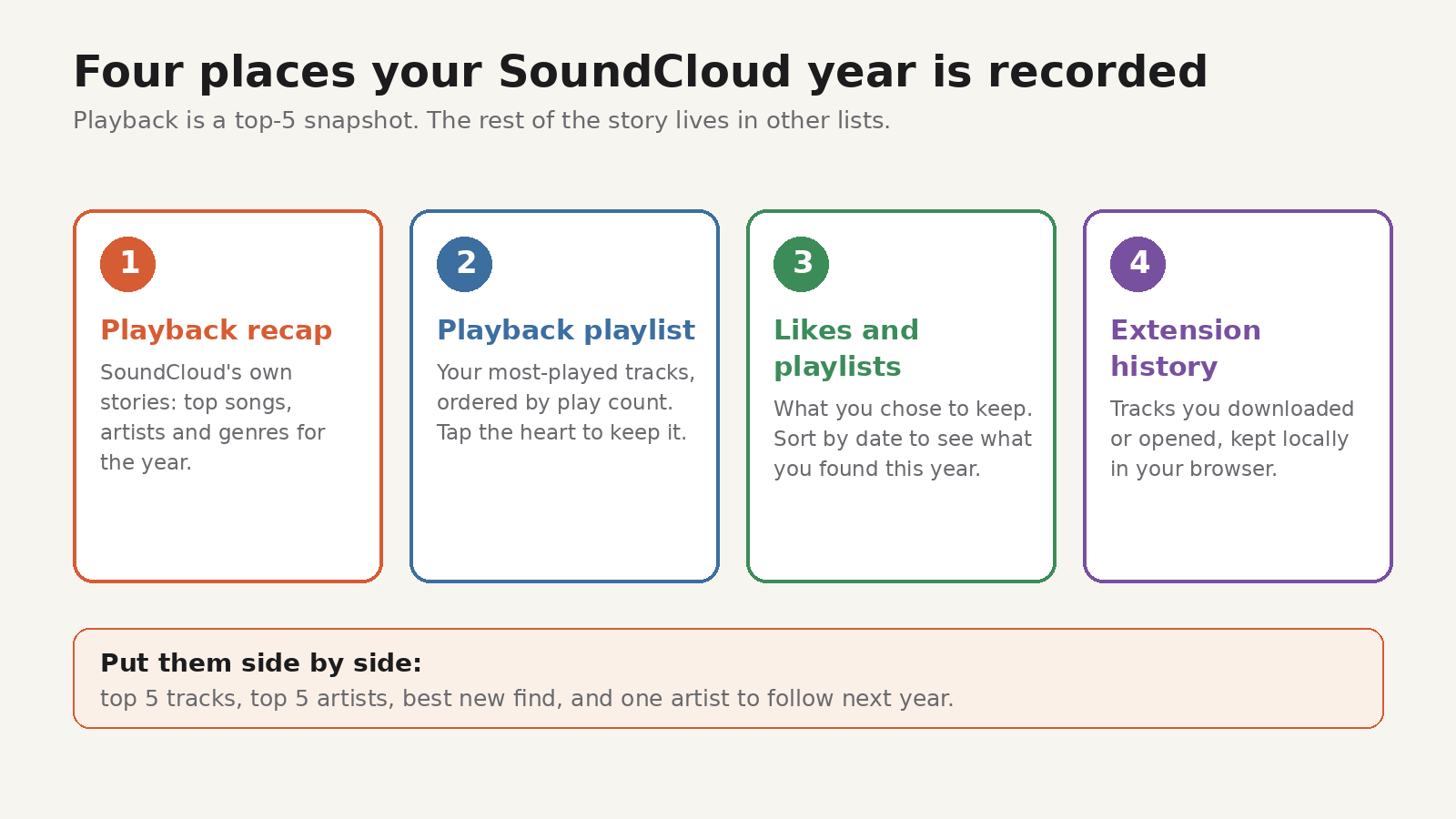
1. Start with Playback. When it arrives, screenshot or save the top lists. They're the "most played" view of your year.
2. Go through your likes. On SoundCloud your likes are listed in your Library. Scroll back to January and note the tracks you liked this year that aren't in Playback. These are usually the discoveries.
3. Check your playlists. A playlist you built this year says more about your taste than a play count. Which ones did you keep adding to?
4. Add your download and viewed history. If you use SoundCloud Enhanced Pro, the extension keeps a local download history you can search by track title or artist, and a private Viewed history of tracks you opened but didn't download. The Viewed list is often the most honest record of what caught your ear: everything you clicked on, including tracks you forgot about. The extension also shows each track's play count, likes, reposts, genre and release information, handy when you want to see how small or big the artists you found this year really are.
5. Write your own top five. Pick five tracks, five artists, one best new find and one artist you want to follow more closely next year. Share it with links to the artists' pages, so anyone who reads it can go and support them.
If you want the numbers in a spreadsheet
The free version of SoundCloud Enhanced Pro covers searching your history and the Viewed list. The one-time Lifetime upgrade (€24.99) keeps up to 1,000 tracks in your download history and lets you export it to CSV or JSON. Open the CSV in any spreadsheet, sort it, and count how often each artist appears to get your own "most saved" list to sit alongside SoundCloud's "most played" one.
Use downloads only for tracks whose uploader has enabled downloads on SoundCloud. SoundCloud's Terms of Use allow downloads where the uploader has enabled them. You're responsible for respecting the uploader's settings and copyright. SoundCloud Enhanced Pro is an independent extension by UnifyBrowse and is not affiliated with or endorsed by SoundCloud.
Make your recap useful to the artists, too
Year-end recaps are a good moment to give something back to the people who made your year sound better:
- Follow the artists from your top five if you haven't already.
- Repost a track from someone small you found this year. On SoundCloud, a repost puts it in front of your followers.
- Buy the track or the merch if the artist links to a store. Buying directly is one of the most direct ways to support an independent artist.
- Save the cover art you love. Our guide to downloading SoundCloud cover art covers sizes and where to find the full-resolution image, for personal use.
If you're looking for more ways to organize a big library, our roundup of the best SoundCloud extensions and our guide to exporting a SoundCloud playlist go deeper.
FAQ
When will SoundCloud Playback 2026 come out?
SoundCloud hasn't announced a date. Last year's Playback appeared in the apps from 3 December 2025, after a counting window that ended on 30 November. Keep the app updated and watch your home page in early December.
Why don't I have a Playback?
Last year you needed at least 10 different artists and 30 different tracks between 1 January and 30 November, and the latest app version. If you listen mostly logged out, those plays don't count toward your account.
Does SoundCloud Playback include my own uploads?
No. SoundCloud says Playback playlists don't include tracks you've uploaded.
Is SoundCloud Playback the same as Spotify Wrapped?
It's the same idea: a personal recap of your top songs, artists and genres, plus a playlist of your most-played tracks. Each service only sees listening on its own platform, so if you split time between them, you'll get two partial pictures.
Can I see my SoundCloud stats any time, not just in December?
Playback is yearly. For a running record, use your likes and playlists in your SoundCloud Library, and, if you use SoundCloud Enhanced Pro, its searchable download and Viewed history in your browser.