Short answer: Vibe coding, where you describe what you want and let an AI write the code, works best when you can tell whether the result is right. A preregistered ETH Zurich study of 100 students found that computer science knowledge was the strongest predictor of how well people did, ahead of writing skill. One of the easiest places to see why is numbers: floating-point rounding, integer limits, 32-bit bitwise operators and two's complement trip up generated code that looks fine and passes a quick test. Below are six bugs to check for, each with a one-line way to spot it.
The vibe coding debate, and what the study found
"Vibe coding" was coined by Andrej Karpathy in early 2025 for building software by prompting a model and accepting what it gives you, without reading the code closely. This week the term is back in the middle of a loud argument on X: fans post whole apps built in an afternoon, and critics post the security holes and broken edge cases that came with them.
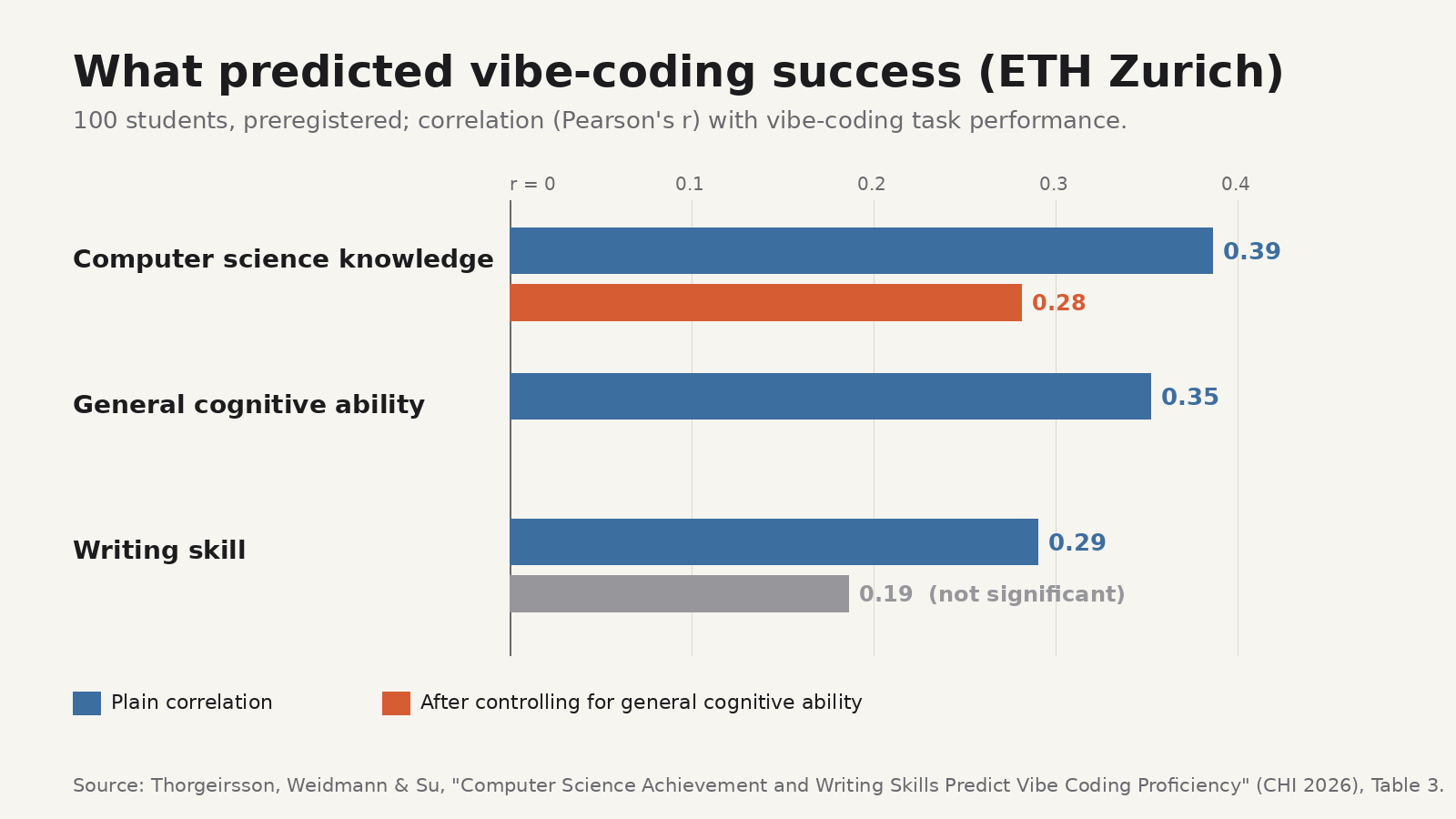
There's actual research behind the argument. In a study presented at CHI 2026, ETH Zurich researchers Sverrir Thorgeirsson, Theo Weidmann and Zhendong Su asked 100 students, all of whom had taken at least an introductory computer science course and had used AI for programming, to complete vibe-coding tasks in a controlled environment without editing the code themselves. They also measured the students' computer science knowledge, general cognitive ability and writing skill.
All three were linked to better results. Computer science knowledge had the strongest plain correlation with performance (r = 0.39), and it was the only one that stayed significant after the researchers controlled for general cognitive ability (r = 0.28). Writing skill also helped and added a smaller, independent contribution in their combined model. The study measures correlation, not cause, but the practical reading is simple: the model writes the code, and you still need to know enough to judge it.
Numbers are a good test of that. Here are six bugs that show up in AI-written code, and in human-written code too.
1. Expecting decimals to be exact
0.1 + 0.2            // 0.30000000000000004
0.1 + 0.2 === 0.3    // false
1.1 * 3              // 3.3000000000000003
JavaScript numbers and Python floats are IEEE 754 double-precision values. Most decimal fractions, including 0.1, can't be stored exactly in binary, so the computer keeps the nearest value it can represent. The tiny errors usually stay hidden until you compare two results with === or add up thousands of values.
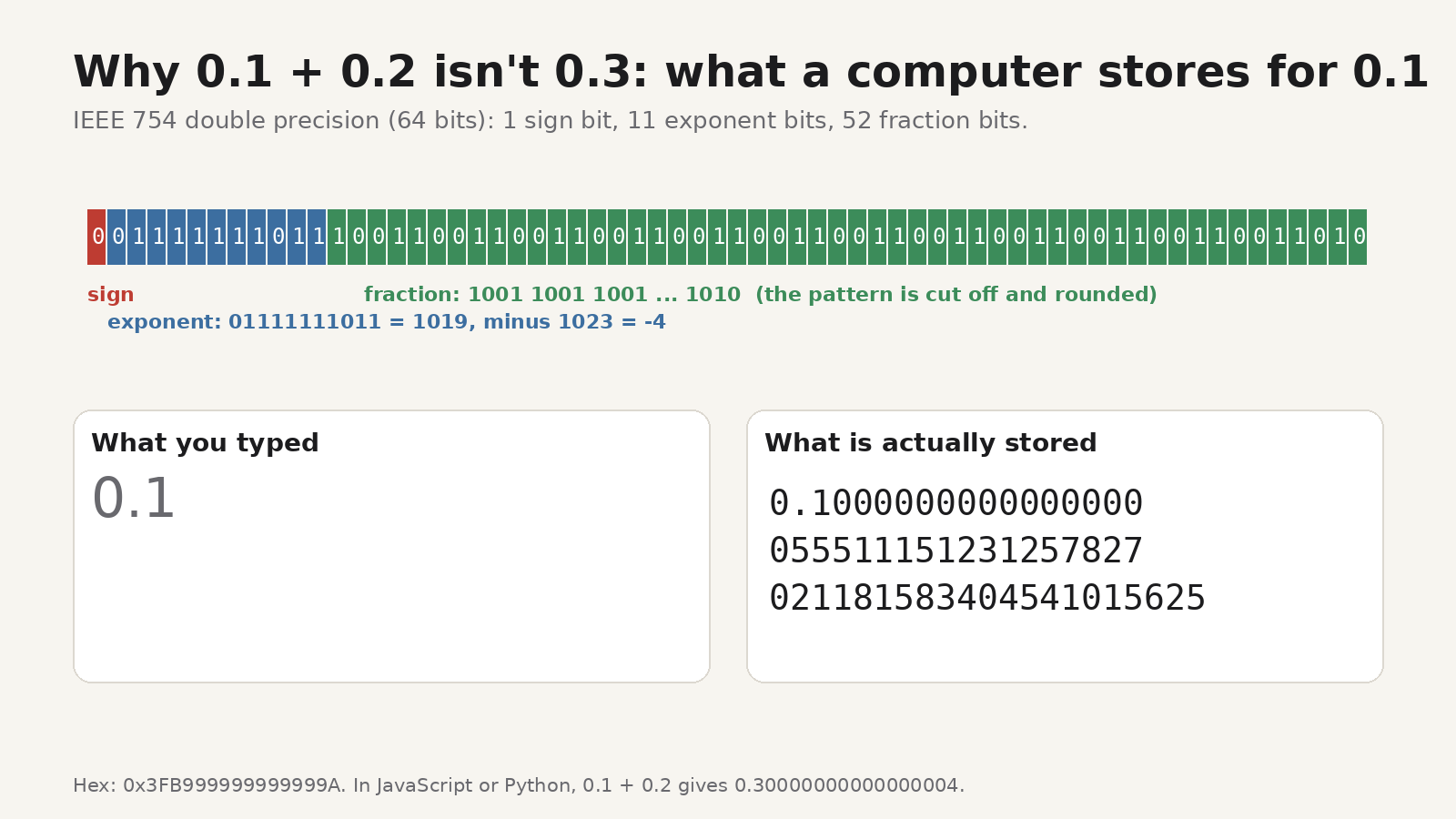
What to check: any === or == between computed decimals, and any money calculation. Compare with a tolerance instead, and store money as whole cents (integers) or use a decimal type. Our guide to visualizing IEEE 754 floats walks through the sign, exponent and fraction bits.
2. Rounding that doesn't round the way you expect
(1.005).toFixed(2)   // "1.00", not "1.01"
Math.round(-2.5) // -2round(2.5) # 2
round(1.005, 2) # 1.0There are two separate surprises here. First, 1.005 is actually stored as 1.00499999999999989..., so it rounds down. Second, different functions use different rules for ties: Python's round uses "round half to even" (banker's rounding), while JavaScript's Math.round rounds halves toward positive infinity, so -2.5 becomes -2.
What to check: prices, percentages and anything shown to users with a fixed number of decimals. Ask the AI which rounding rule the code uses, and test values that end in 5.
3. Integers that quietly lose precision
2 ** 53 + 1 === 2 ** 53                   // true
Number.MAX_SAFE_INTEGER                   // 9007199254740991
JSON.parse('{"id":9007199254740993}').id  // 9007199254740992
A double has 53 bits of precision, so above 9,007,199,254,740,991 JavaScript can't represent every integer. The dangerous case is IDs: database keys, social media post IDs and order numbers can be 64-bit integers, and parsing them as normal JSON numbers silently changes the last digits.
What to check: any large ID that passes through JavaScript. Keep it as a string, or use BigInt where you need arithmetic.
4. Bitwise operators that turn your number into 32 bits
1 << 31              // -2147483648
3000000000 | 0       // -1294967296
-1 >>> 0             // 4294967295
In JavaScript, bitwise operators (&, |, ^, ~, <<, >>) convert their operands to 32-bit signed integers first. Generated code sometimes uses x | 0 as a "fast" way to drop decimals. That works for small numbers and breaks for anything above about 2.1 billion, which includes millisecond timestamps and file sizes over 2 GB.
What to check: | 0, ~~x and shifts used on values that can get large. Use Math.trunc() to drop decimals, and >>> when you need an unsigned result.
5. Two's complement and the sign bit
import struct
# The byte 0xC8 (200) read as a signed 8-bit integer
struct.unpack('b', bytes([200]))[0]   # -56
Signed integers are stored in two's complement, where the top bit carries the sign. The same eight bits, 11001000, mean 200 as an unsigned byte and -56 as a signed one. Bugs appear when code reads binary data (file headers, network packets, sensor values) with the wrong signedness, or when >> (which keeps the sign) and >>> (which doesn't) get swapped: -8 >> 1 is -4, while -8 >>> 1 is 2147483644.
What to check: every place the code reads raw bytes, and every right shift on a value that could be negative. Our two's complement guide explains the bit patterns step by step.
6. Text length that counts the wrong thing
"👍".length                    // 2
[..."👍"].length               // 1
"é".normalize("NFD").length    // 2
JavaScript string length counts UTF-16 code units, not characters. An emoji outside the Basic Multilingual Plane takes two code units, and an accented letter can be one code point or two depending on how it was typed. Character limits, truncation and "first letter" logic in generated code often get this wrong.
What to check: any length limit or substring on user-entered text. Test with an emoji and an accented name.
A quick review routine for AI-written code
You don't have to read every line to catch most of these. Before you accept generated code that handles numbers:
- Search for
===between decimals,toFixed,Math.round,| 0and>>. - Test the edges: 0, negative numbers, values ending in .5, numbers above 2³¹ and above 2⁵³, an emoji.
- Ask the model to explain its number handling in plain words, then check the explanation against the code.
- Look at the bits when a result is odd. Convert the value to binary or hex and see what's really stored.
That last step is where a small tool helps. BitLens is our free Chrome extension for exactly this kind of check: it converts between decimal, hex, binary and octal as you type, breaks an IEEE 754 float into its sign, exponent and mantissa, runs bitwise operations including AND, OR, XOR, NOT and shifts, and shows two's complement values and ASCII/Unicode lookups. You can also highlight a number on any web page and convert it from the right-click menu, which is handy when you're reviewing code or logs in the browser. It runs locally in your browser.
FAQ
Does the ETH Zurich study mean non-programmers can't vibe code? No. Every participant had at least an introductory computer science course, and the study measures correlation, not cause. It suggests that knowing how software works makes AI-assisted programming more successful, and that clear writing helps too.
Should I stop using floats? No. Floats are fine for measurements, graphics and science. Avoid exact comparisons, and use integers or a decimal type for money.
Why doesn't the AI just get this right? Often it does. But these bugs pass simple tests, so code that looks correct on the happy path can still fail on large, negative or unusual values. That's why the edge-case test in the routine above matters.
Is this only a JavaScript problem? No. The float and rounding issues apply to most languages that use IEEE 754 doubles, and two's complement applies to signed integers almost everywhere. JavaScript just has a few extra surprises, like 32-bit bitwise operators and UTF-16 string length.