Short answer: Project Gutenberg's website has been offline since the weekend of 15 November while its volunteers rebuild it after vandals got into its servers. The books themselves are safe, and the team said on 24 November that the site might be back on Wednesday. Until it is, you can read the same books through the mirrors Project Gutenberg itself recommends: the Internet Archive, Kiwix and GITenberg on GitHub. The bigger lesson is a simple one: if you rely on a single website for what you read, keep your own copies.
What happened to Project Gutenberg
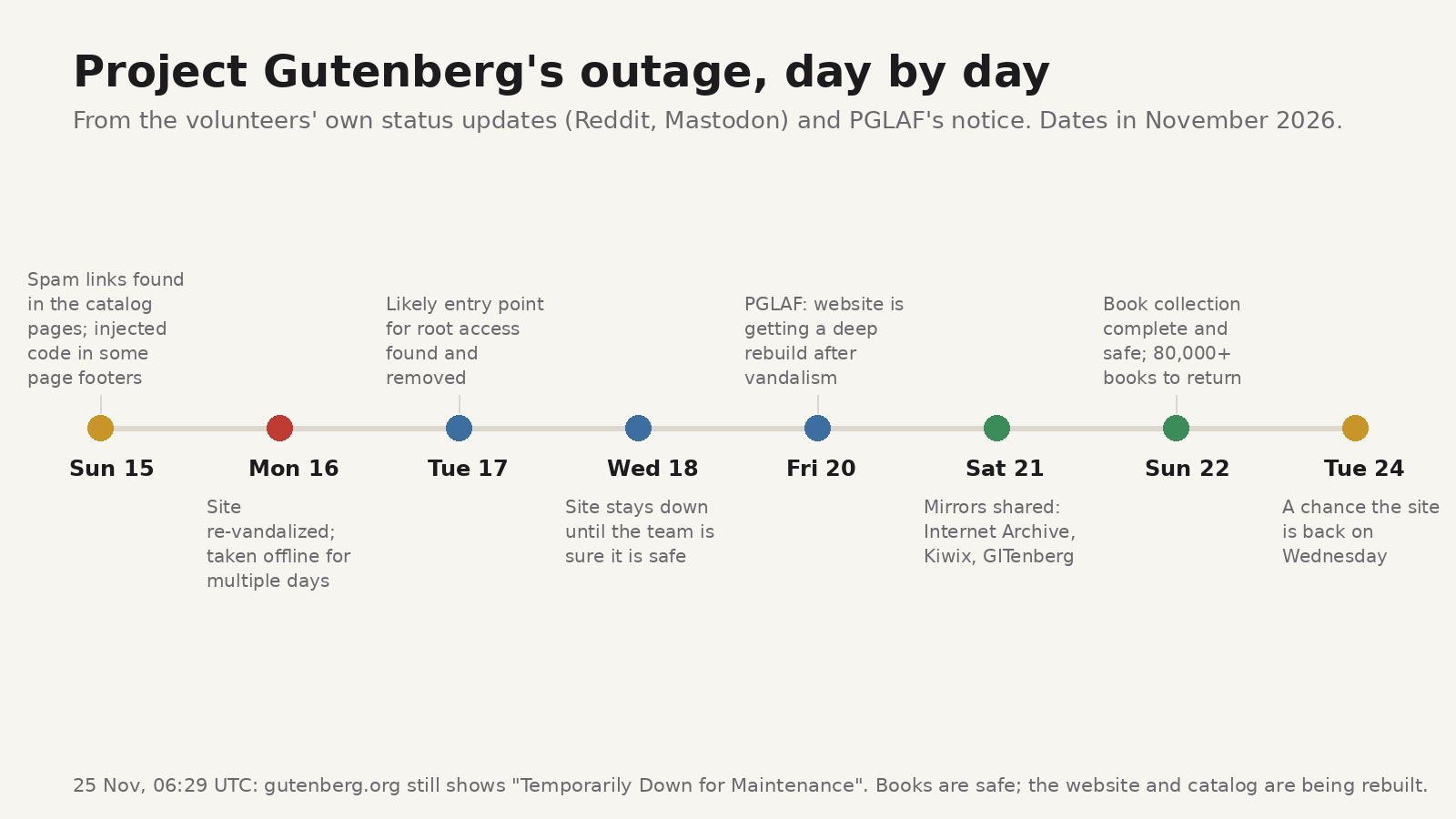
Project Gutenberg has been putting public-domain books online since 1971 and holds more than 80,000 free ebooks. It's run by a small group of volunteers, and on Sunday, 15 November, they noticed something wrong: links in the catalog pages were sending visitors to spam sites. Over the next few hours they kept finding injected code in parts of the site, including some page footers.
The site came back briefly, then was vandalized again. In status updates posted on Reddit and collected by the science fiction news site File 770, the team said on Monday that the site would be offline for multiple days because "traces of the vandalism are more extensive than we saw on first review." On Tuesday they said they had found and removed a likely entry point for the root access. On Wednesday they said they wouldn't bring the site back "until we're 100% sure the site is safe."
On 20 November the Project Gutenberg Literary Archive Foundation, the nonprofit behind the project, posted a notice that the website "is undergoing a deep rebuilding due to vandalism." Two days later the team wrote on Mastodon that "our book collection is complete and safe," that most of the work was on the website and catalog, and that more than 80,000 books would return as soon as the website does. On 24 November they added: "There is a chance the website will be up on Wednesday."
When we checked on the morning of 25 November (UTC), gutenberg.org still showed a "Temporarily Down for Maintenance" page.
Where to read Project Gutenberg books right now
You don't have to wait. On 21 November Project Gutenberg pointed readers to three mirrors:
- Internet Archive. The Project Gutenberg collection on archive.org has a large share of the library, usually with EPUB, plain text and other formats to download.
- Kiwix. Kiwix's online library lets you browse Gutenberg books by language. Kiwix is also known for offline packages you can download and read without an internet connection.
- GITenberg. The GITenberg project on GitHub keeps Gutenberg texts as code repositories. It's handy if you're comfortable with GitHub, less so for casual reading.
One caution: while investigating, the team asked people who run mirrors to report any books containing the text "asiafilm," which suggests the attackers tampered with some files. If you downloaded a Project Gutenberg book from anywhere during the outage and it contains that word or anything that looks like spam, delete it and get a fresh copy once the main site is back.
Why this matters even if you never use Project Gutenberg
Libraries, archives and fan sites are often run by small teams on tight budgets, and one bad week can take them down. Commercial services aren't safer: products shut down, prices change, and pages get moved or deleted. We wrote about the general problem in our guide to link rot.
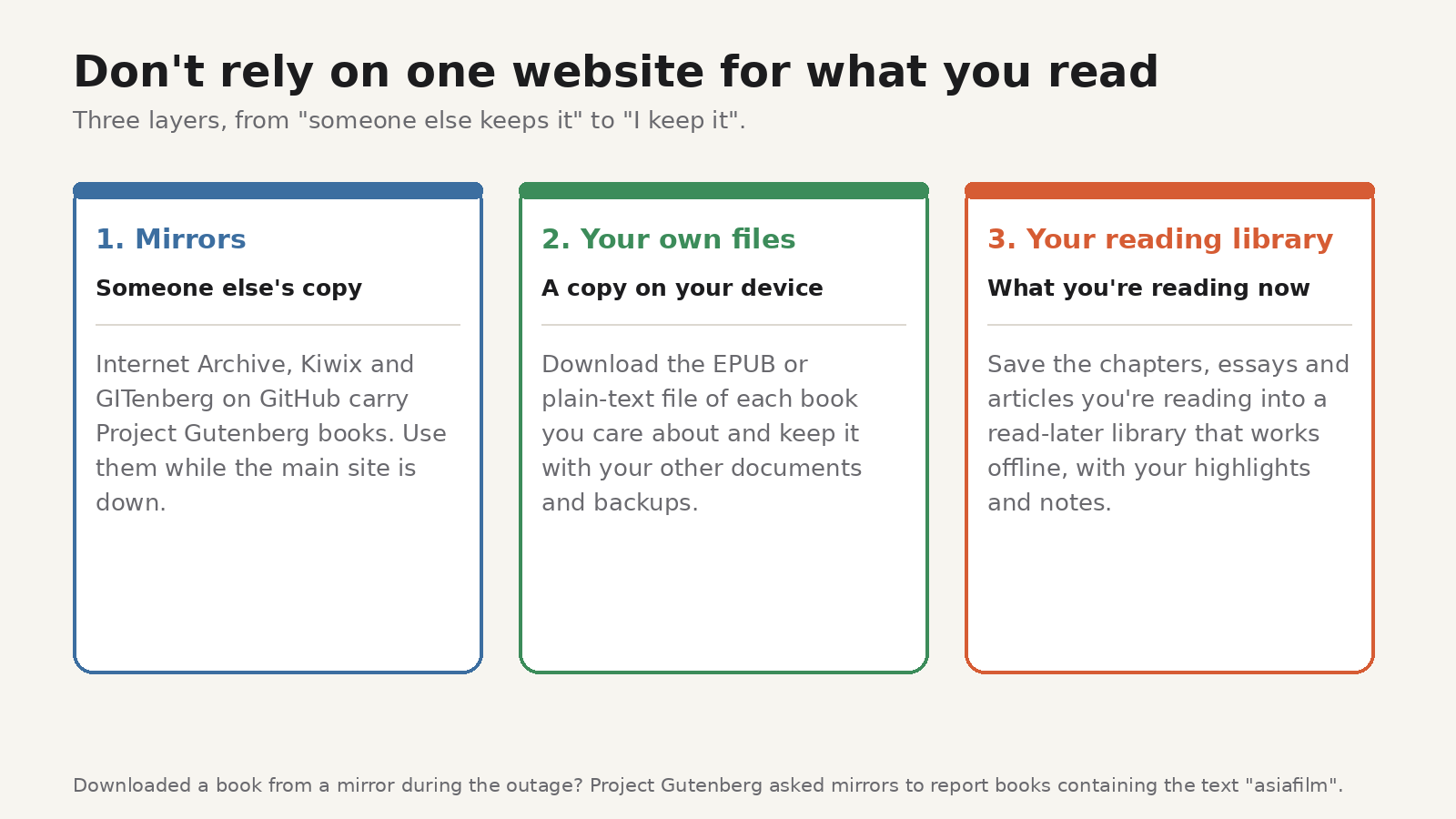
None of this means you should stop using these sites. It means you shouldn't rely on any single one of them as your only copy of something you care about. A good setup has three layers.
Layer 1: know your mirrors
For public-domain books, there's usually more than one source. Note where else a book lives before you need it: the Internet Archive, Kiwix, a university library's digital collection, or a national library. When your usual site goes down, you'll know where to go instead of searching under pressure.
This applies beyond books. If you rely on a particular reference site, documentation page or archive, take a minute to find out whether it has an official mirror or export. Many projects publish one but don't advertise it.
Layer 2: download the books you care about
Public-domain ebooks are meant to be downloaded and kept. If there's a book you return to often, or one you're reading for a course or project, download it in a format that will last:
- EPUB works with almost every e-reader app and keeps chapters and formatting.
- Plain text is the most durable format of all. It opens in any text editor, decades from now, on any device.
- Keep the files with your other documents, in a folder that's included in your normal backups, not just in your Downloads folder.
A small personal library of the books that matter to you takes up a few megabytes and removes your dependence on any one website being up.
Layer 3: keep what you're reading in a library you control
Most of what we read online isn't whole books. It's chapters, essays, poems, articles about books, reading guides and notes. That's the material that disappears quietly, and it's what a read-later library is for.
This is what we built Cairn to do. Cairn is a free browser extension for Chrome and Firefox that saves pages, articles, selected text, images and links into a library that stays in your browser, on your device, with no account. A few features are useful for exactly this kind of situation:
- Reading without a connection. Cairn saves articles as clean, readable text you can open without an internet connection, with optional saved images. If a site goes down tomorrow, the pages you saved are still there.
- Highlights and notes. Highlight in five colors, add notes, and pick up exactly where you left off.
- Search across everything. Search titles, URLs, notes, tags and the article text itself.
- Exports, so you're never locked in. Export to Markdown for Obsidian, a Readwise CSV, a bookmarks HTML file, or a full JSON backup.
Cairn is built for web pages and articles, not ebook files, so keep using an EPUB reader for whole novels. Where it helps is with the HTML chapters, essays and articles you read in your browser. And because there's no account and no sync, your library lives on one computer. To move it to another one, export a backup and restore it there.
If you're coming from Pocket, which shut down in 2025, Cairn can import your Pocket export with tags and saved dates; our Pocket alternative page walks through it.
A simple routine you can start today
- Pick five things you'd hate to lose. Books you reread, reference pages you check, essays you quote.
- Find a second source for each. A mirror, an official archive, or a library collection.
- Download the books as EPUB or plain text into a folder that gets backed up.
- Save the web pages you rely on into a read-later library you can use without an internet connection.
- Make a backup of that library every month or so, and keep it with your other backups.
It takes half an hour, and the next time a site you depend on goes dark, it becomes a minor inconvenience instead of a loss.
For more on saving articles for offline reading in Chrome and Firefox, see our guide to saving web pages for offline reading.
FAQ
When will Project Gutenberg be back? The team hasn't given a firm date. On 24 November it said there was a chance the site would be up on Wednesday, 25 November. Its Mastodon and Bluesky accounts post status updates.
Were Project Gutenberg's books damaged? The team says the book collection is complete and safe and that most of the repair work is on the website and catalog. It did ask mirror operators to report books containing the text "asiafilm," so be cautious with copies downloaded during the outage.
Is it legal to download Project Gutenberg books? Project Gutenberg focuses on books that are in the public domain in the United States. Copyright terms differ between countries, so if you live elsewhere, check whether a book is in the public domain where you are.
Can I help Project Gutenberg? The Project Gutenberg Literary Archive Foundation accepts donations through pglaf.org, which it describes as the project's sole source of ongoing financial support.