Short answer: CVE-2026-125396, nicknamed Upload2Shell, is a flaw in Ghostscript, the PostScript and PDF interpreter that many servers use behind the scenes to make thumbnails and previews. A crafted file can escape Ghostscript's -dSAFER sandbox and run commands with the permissions of the process that rendered it. The fix is in Ghostscript 10.08.0, released on 8 September 2026, and in patched distribution packages. If you run anything that turns uploaded files or email attachments into previews (WordPress, webmail, wikis, document systems, a print server), check which Ghostscript it actually uses and update it.
What was found
The bug was reported to Artifex, Ghostscript's developer, by Paulos Yibelo and the research company pwn.ai. Artifex fixed it in early September, and the CVE was published on 9 November. On 21 November, pwn.ai published a detailed write-up, which is when the story spread widely.
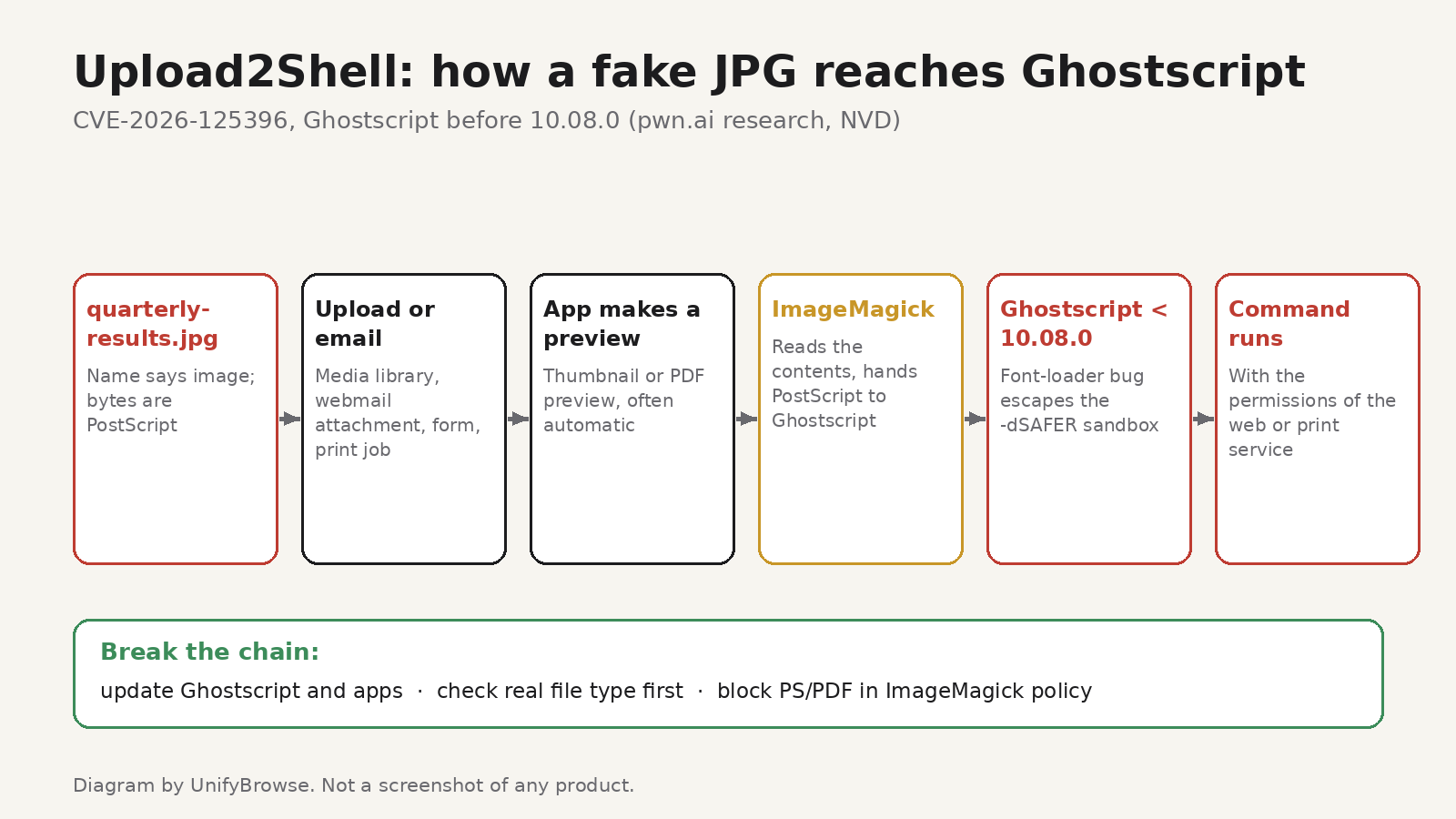
The official description: Ghostscript before 10.08.0 has a -dSAFER bypass in a font-loading helper called .putgstringcopy. The helper uses a privileged internal operator, .forceput, without checking the types of the values it's given. A crafted PostScript or PDF document can trigger an error, recover that privileged operator through its own error handler, and cause a use-after-free that leads to arbitrary code execution.
In plain terms: -dSAFER is the mode applications rely on when they let Ghostscript open files they don't trust. This bug lets a document switch those protections off from the inside.
The CVE's own score is 8.5 (high) under CVSS 4.0, calculated with a local attack vector. pwn.ai's point is that in real deployments the file usually arrives from the network, because so many applications hand untrusted uploads to Ghostscript without the user ever knowing.
How a "JPG" ends up in Ghostscript
Most web applications don't call Ghostscript directly. They call an image library, often ImageMagick (or Imagick, its PHP binding), to make a thumbnail. ImageMagick decides how to read a file by looking at its contents, not just its name. If the bytes inside a file called photo.jpg are actually PostScript, ImageMagick can pass it to Ghostscript to render.
pwn.ai showed several paths like this, each tested in a lab:
- Roundcube webmail: an outside sender emailed an attachment named
quarterly-results.jpgthat was really PostScript. When the recipient simply viewed the message, Roundcube requested a thumbnail and the command ran as the web server user. This route depended on a permissive ImageMagick configuration. - WordPress: a user with upload rights (Author and above by default) could trigger it through the media library on sites using Imagick and Ghostscript. Two plugins with public upload forms exposed the same path to visitors without an account.
- CUPS printing: on Debian 13, a PostScript job sent to a shared network print queue that accepted jobs without authentication ran a command on the host.
- Wikis and document systems: MediaWiki with PDF thumbnails and anonymous uploads enabled, DokuWiki with its optional ImageMagick backend, and a document management system that imports email automatically.
The researchers say their wider Ghostscript work also reached file-processing pipelines at large online services, including Google and Dropbox, and that those findings were reported to the companies.
Who needs to act
You probably need to check something if you run:
- a website that accepts uploads and makes thumbnails or previews, especially WordPress with Imagick,
- self-hosted webmail, a wiki, a helpdesk or a document system that previews attachments,
- a Linux print server with shared queues,
- any service or container image that bundles ImageMagick or Ghostscript.
You probably don't need to do anything if you only use websites and email. This is a server-side problem. Keep your own computer's packages updated as usual, since desktop Linux systems also ship Ghostscript, but there's no setting for you to change.
How to check your servers
1. Find the Ghostscript version that actually runs
On the server or inside the container that renders files:
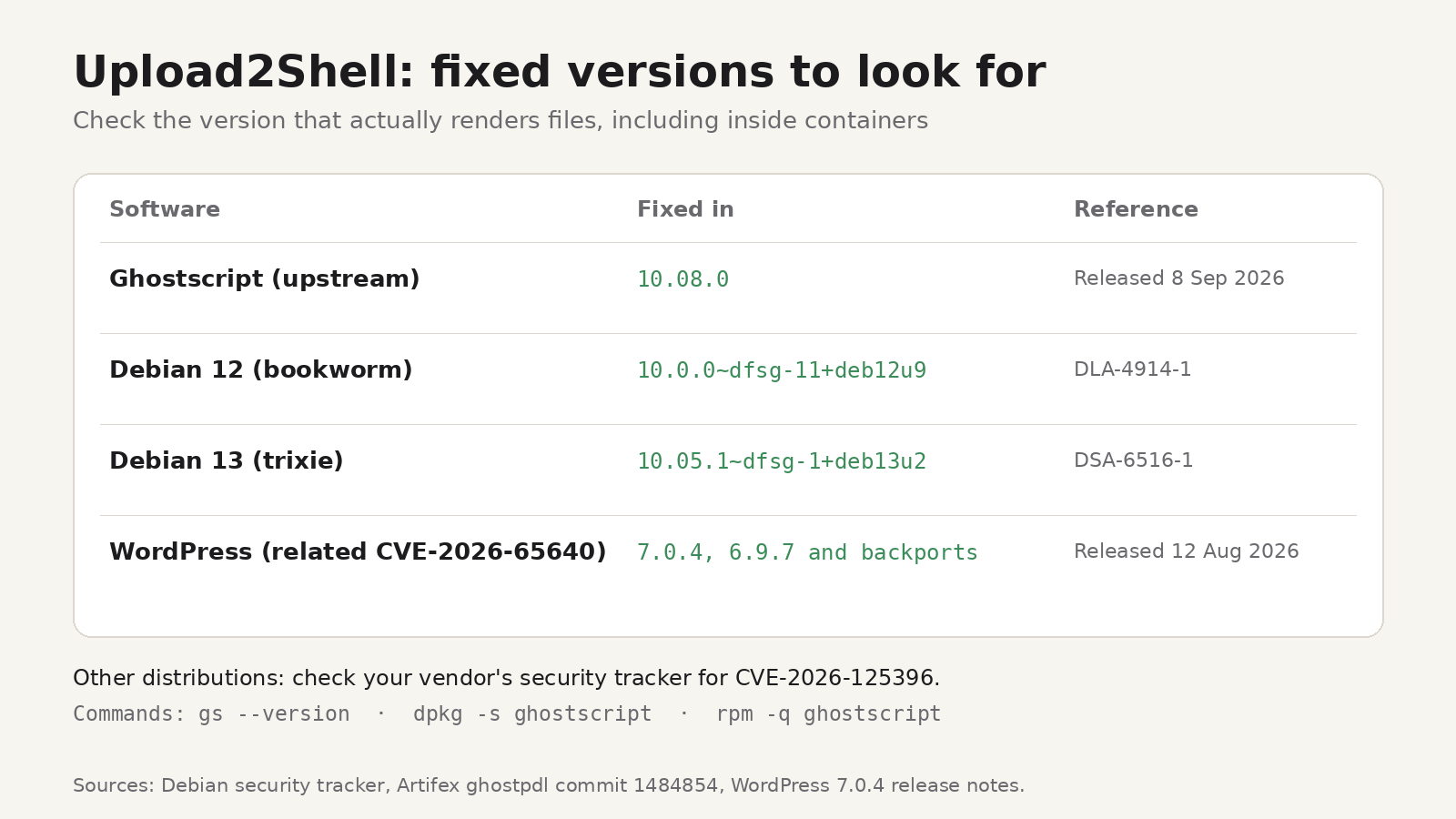
gs --versionAnything below 10.08.0 is vulnerable unless your distribution has backported the fix. On Debian and Ubuntu, check the package version instead of the upstream number:
dpkg -s ghostscript | grep VersionOn Fedora, RHEL and similar systems:
rpm -q ghostscriptThen compare with your distribution's security tracker. Debian's tracker, for example, lists 10.0.0~dfsg-11+deb12u9 as fixed for Debian 12 (bookworm) and 10.05.1~dfsg-1+deb13u2 for Debian 13 (trixie). pwn.ai found coverage uneven across distributions as of mid-November, so check the tracker for your release rather than assuming.
2. Don't forget containers and bundled copies
Updating the host doesn't update a Ghostscript inside a container image or an application bundle. Rebuild images that include ImageMagick or Ghostscript and redeploy them. To check a running container, here one named web, ask it directly:
docker exec web gs --version3. Update the applications too
WordPress closed its own route into Ghostscript in version 7.0.4 on 12 August 2026 (CVE-2026-65640), with fixes backported to older branches such as 6.9.7. The WordPress patch checks a file's real contents before handing it to Imagick. Update WordPress and its plugins, and check whether other applications you run have similar releases.
4. Tighten ImageMagick's policy
If your application only needs ordinary images, ImageMagick doesn't need to call Ghostscript at all. Its security policy file (policy.xml) can block that. ImageMagick's own security policy documentation includes a rule that disables all external delegates, including Ghostscript:
<policy domain="delegate" rights="none" pattern="*"/>You can also block the PostScript-family and PDF formats outright if you never process them:
<policy domain="coder" rights="none" pattern="{PS,PS2,PS3,EPS,PDF,XPS}"/>Run magick -list policy (or convert -list policy on ImageMagick 6) to confirm which policy is active. ImageMagick also publishes a "websafe" example policy that limits input to GIF, JPEG and PNG.
5. Check file types before you render them
pwn.ai notes that Roundcube generated the thumbnail before checking the attachment's real type, which gave the renderer the first look at the file. Check the actual file signature first, and refuse anything that doesn't match what you expect.
6. Lock down print queues
If you share printers with CUPS, require authentication for remote jobs and don't expose queues beyond the network that needs them.
The bigger lesson: previews are code execution
Image previews feel harmless, but a preview means running a complex parser on a file someone else chose. Ghostscript has had -dSAFER bypasses before, and the maintainers say in the fix that they're working to remove .forceput altogether, which they describe as hard after decades of code that depends on it. Treat any renderer that touches untrusted files as exposed: keep it updated, give it as little access as possible, and limit which formats it accepts.
It's the same pattern behind other recent bugs we've covered, from the NGINX HTTP/2 flaws to malicious Python packages: software deep in the stack that most people never think about, until it's the way in.
On your own computer, the same idea applies on a smaller scale. If you only need to resize or convert a photo, you don't have to upload it to an online converter. Image Resizer, our browser extension for Chrome and Firefox, resizes and converts JPG, PNG and WebP images on your device without uploading them, and has a free plan.
FAQ
Is CVE-2026-125396 being exploited in the wild?
The advisories and the research write-up we checked don't report attacks in the wild. The research includes working proof-of-concept chains, and pwn.ai plans to publish more detailed case studies, so patching now is the safe choice.
Which Ghostscript version fixes it?
Upstream Ghostscript 10.08.0, released on 8 September 2026. Distributions may ship the fix as a backport to an older version number, so check your distribution's tracker.
Does it affect ImageMagick itself?
The bug is in Ghostscript. ImageMagick is affected only when it hands a file to a vulnerable Ghostscript, which a restrictive policy.xml can prevent.
I run WordPress on managed hosting. What should I do?
Make sure WordPress is on 7.0.4 or later (or the patched release of your branch), update plugins, and ask your host whether their servers run a fixed Ghostscript.