Short answer: On 18 November 2026, F5 released NGINX 1.30.7 (stable) and 1.31.9 (mainline) to fix a batch of memory-safety bugs that researchers call "nginx2root". The two most widely exposed, CVE-2026-123007 and CVE-2026-123633, affect servers with HTTP/2 switched on (the second also needs NGINX to be proxying to a backend) and can let an unauthenticated attacker run code on the server. Check which NGINX version every server, container and ingress controller runs, upgrade, and restart. If you can't upgrade today, turning HTTP/2 off blocks those two bugs, but not the rest of the batch.
What was disclosed
NGINX's own security advisories page lists ten issues fixed in mainline 1.31.9; nine of them also apply to the stable branch and are fixed in 1.30.7. According to Sophos's summary of the F5 advisories, F5 rates five of them 8.1 (High) under CVSS 3.1 and 9.2 (Critical) under CVSS 4.0, and proof-of-concept exploit code for CVE-2026-123007 is public.
The Wiz Research write-up says several teams found the two HTTP/2 bugs independently: Wiz, Ikotas Labs, Metnir, Rapid7 and Xint. Wiz showed code execution on an NGINX server that was serving only ordinary static files, with no backend application and no third-party modules. That matters, because many people assume a "plain" static site has nothing to exploit.
There are limits worth knowing. Rapid7's analysis says its proof of concept needs about 128 GB of HTTP/2 traffic: roughly two minutes on a 10 Gbit/s link and seventeen minutes on 1 Gbit/s. Below about 300 Mbit/s the attack runs past NGINX's default one-hour connection lifetime. Code runs with the permissions of the NGINX worker process, and Rapid7 says it has not shown execution as root. Bitsight reports that Xint, which named the batch, chained the NGINX bugs with a separate Linux kernel SCTP flaw to get root on the host, and that no kernel patch was available when it published. None of that is a reason to wait. Public exploit code tends to improve, and the fix is a routine upgrade.
Are you affected?
The bugs need different configurations. This summary follows the NGINX advisories page and the Wiz and Sophos write-ups:
| CVE | What it is | Needs | Vulnerable versions |
|---|---|---|---|
| CVE-2026-123007 | Memory corruption in HTTP/2 flow control | HTTP/2 enabled, including plain static sites | 1.9.5 to 1.31.8 |
| CVE-2026-123633 | Use-after-free in HTTP/2 | HTTP/2, proxying to a backend, worker running low on connections | 1.19.7 to 1.31.8 |
| CVE-2026-121810 | Use-after-free in HTTP/3 | HTTP/3 (QUIC), proxying to a backend | 1.25.0 to 1.31.8 |
| CVE-2026-123634 | Use-after-free in the resolver | proxy_pass built from variables, plus a mirror or SSI subrequest to the same name |
0.6.18 to 1.31.8 |
| CVE-2026-113425 | Use-after-free in the mail proxy | NGINX used as a mail proxy | 0.5.33 to 1.31.8 |
The fixed releases are 1.30.7 and 1.31.9 for all five. Version 1.9.5, where the flow-control bug starts, was the first NGINX release with HTTP/2 support, as Bitsight notes, so any HTTP/2 server from the last decade that hasn't been updated this week is in scope.
How to check your servers
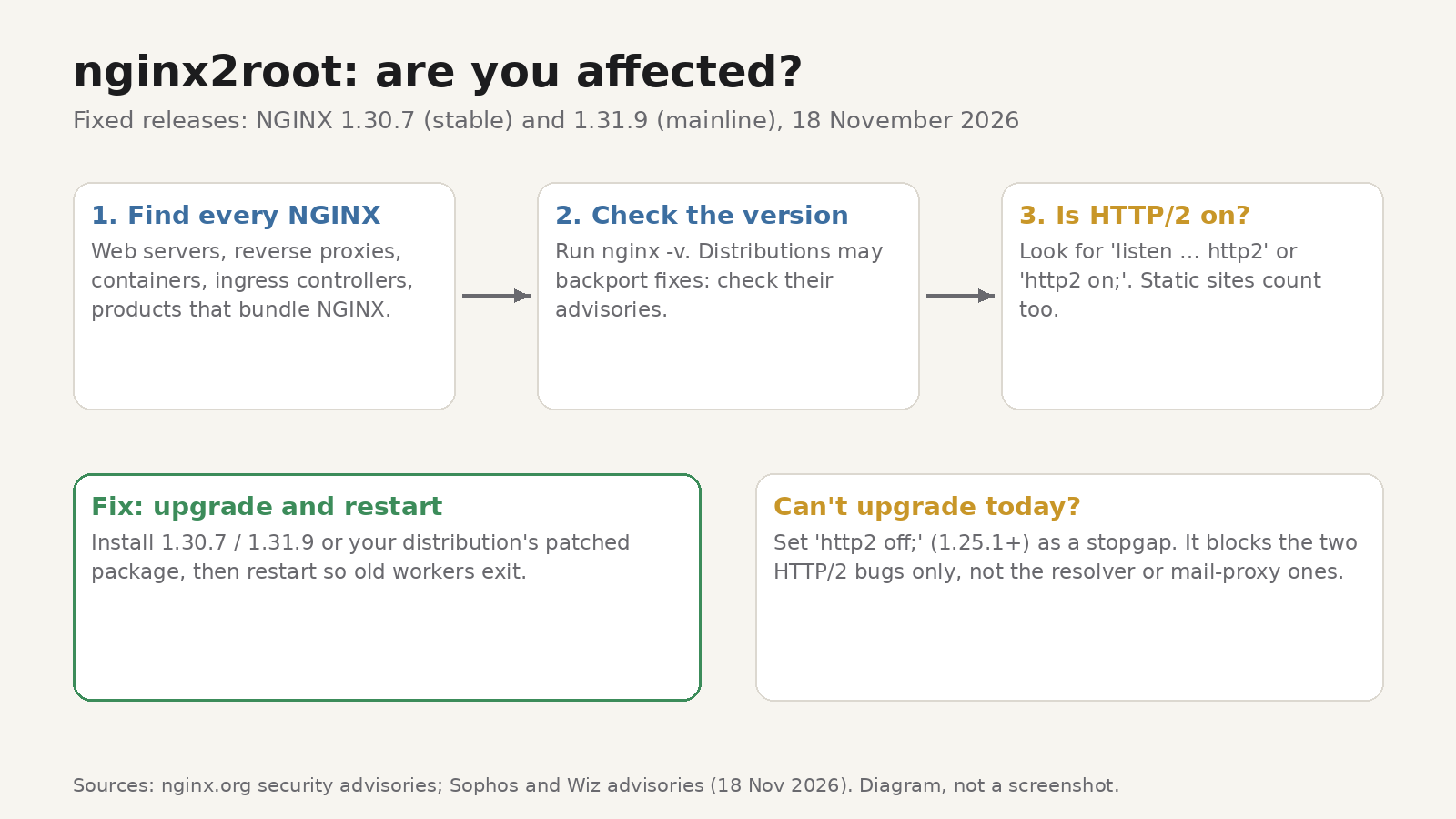
1. Find every NGINX. Look beyond the obvious web servers. Reverse proxies, load balancers, Docker images, Kubernetes ingress controllers and products that bundle NGINX, such as OpenResty, all count. Sophos advises starting with internet-facing systems and with instances where NGINX itself accepts HTTP/2 or HTTP/3 from clients.
2. Read the version. On a host, run:
nginx -vIt prints a line such as nginx version: nginx/1.30.7. For a container image, run the same command inside it, for example docker run --rm <image> nginx -v.
3. Don't trust the version number alone on Linux distributions. Distributions often backport security fixes without changing the upstream version, so an older-looking number can still be patched. Check your distribution's security tracker for the CVE numbers above.
4. Check whether HTTP/2 is on. Search your configuration for http2:
grep -Rn "http2" /etc/nginx/A listen 443 ssl http2; line or an http2 on; directive means HTTP/2 is enabled for that server block.
5. Check embedded copies separately. The vendor of each product has to ship its own update. One example from Anyscale's bulletin: the Kubernetes community archived the ingress-nginx project, its final controller image bundles NGINX 1.27.1, which is vulnerable, and that project won't release a fix. If you run it, you need a patched fork from your vendor or a different ingress controller.
How to fix it
Upgrade to NGINX 1.30.7 or 1.31.9 (or your distribution's patched package, or the fixed NGINX Plus build), then restart NGINX so the patched binary is actually running. Sophos's advisory puts it plainly: update and restart.
If you can't upgrade straight away, Wiz recommends turning HTTP/2 off as a stopgap. On NGINX 1.25.1 or later, set http2 off; in the affected server blocks and remove the http2 parameter from any listen lines. Test your application, reload NGINX and confirm the old worker processes have exited. Browsers will fall back to HTTP/1.1. Sophos notes that turning off HTTP/2 blocks only CVE-2026-123007 and CVE-2026-123633, and turning off HTTP/3 only CVE-2026-121810. The resolver and mail-proxy bugs still need the upgrade.
Wiz also suggests looking for unexpected NGINX worker crashes or commands started by NGINX processes. Those are general warning signs, not confirmed indicators of these bugs.
If you only visit websites, there's nothing for you to patch. These bugs are in servers, and site owners have to update them.
How a counter that "can't" go above a limit did
The flow-control bug is a good lesson in how unsigned arithmetic fails quietly.
HTTP/2 lets a client limit how much data a server sends before the client is ready for more. That allowance is called a flow-control window, and RFC 9113, the HTTP/2 standard, caps it: "A sender MUST NOT allow a flow-control window to exceed 2^31-1 octets." That's 2,147,483,647 bytes, or 0x7FFFFFFF in hex.
According to Wiz and Rapid7, NGINX keeps the connection's remaining allowance in h2c->send_window, an unsigned 64-bit counter, which can hold values far above the protocol cap. Three steps go wrong:
- A refund without a cap check. When NGINX queues response data, it subtracts the size from the counter. If the client cancels that stream before the data is sent, NGINX adds the unused amount back. That refund doesn't check the 2^31−1 maximum, so if the client has already raised the window in the meantime, the counter ends up above the limit.
- A bounds check that wraps. When the client later asks for a bigger window, NGINX checks
if (window > NGX_HTTP_V2_MAX_WINDOW - h2c->send_window). With the counter already above the maximum, that subtraction would be negative, but unsigned integers can't be negative. The result wraps around to a huge positive number, and the check passes. - A cast that turns huge into negative. The oversized value later becomes a signed 64-bit length (
off_t) in the send path. In two's complement, a value with the top bit set reads as negative, and a negative length ends up driving an out-of-bounds memory copy.
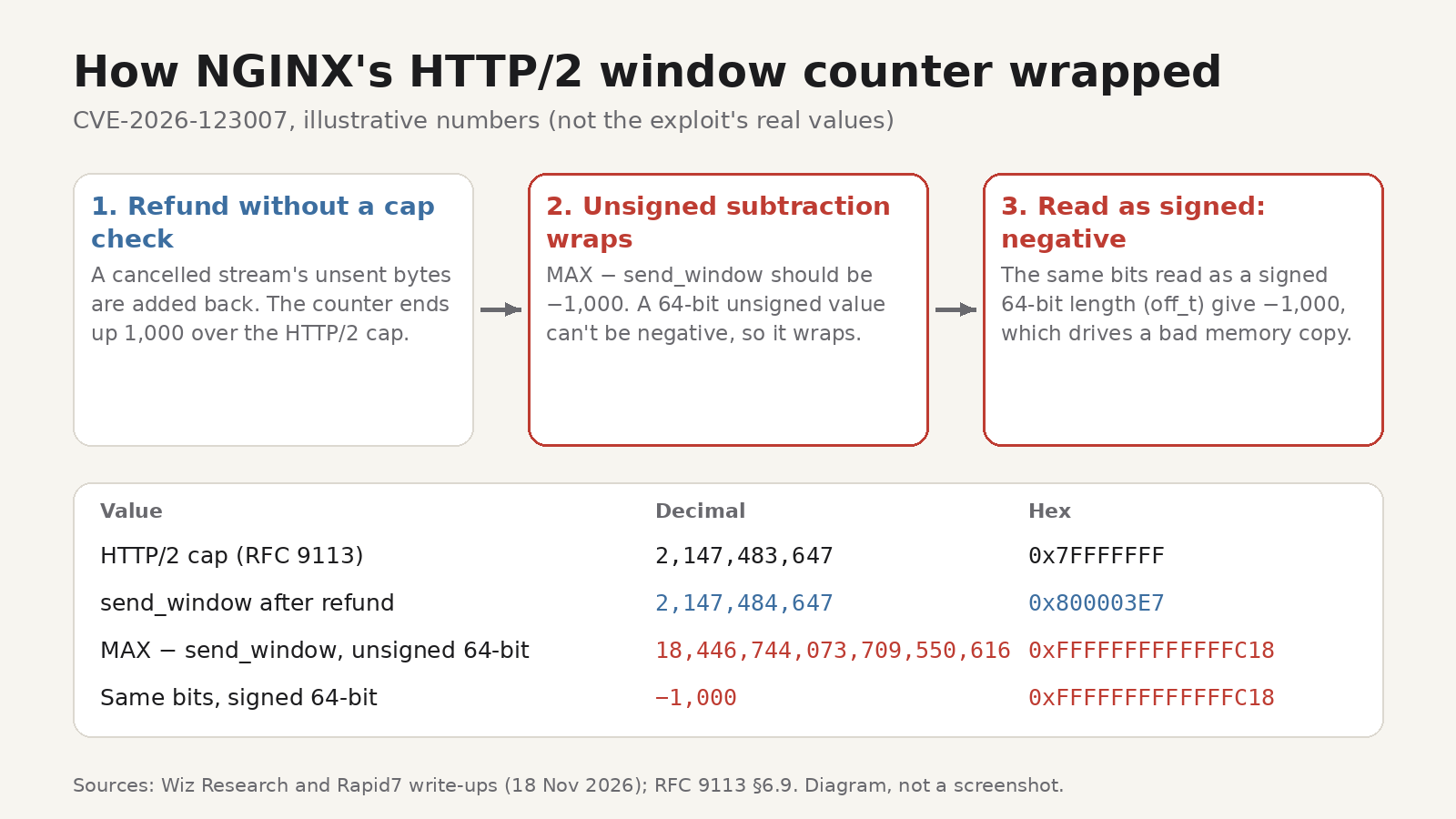
Here's the arithmetic with illustrative numbers (not the exploit's real values). Say a refund leaves the counter 1,000 bytes over the cap, at 2,147,484,647. The check computes 2,147,483,647 − 2,147,484,647. In ordinary maths that's −1,000. In 64-bit unsigned arithmetic it wraps to 18,446,744,073,709,550,616, which is 0xFFFFFFFFFFFFFC18, so no window increase looks too big. Read those same 64 bits as a signed number and you get −1,000 again. The bits never changed; only the type used to read them did.
The defensive patterns are old but easy to forget: enforce a protocol limit at every place that writes the counter, not just where the client changes it; compare before you subtract (if (send_window > MAX || window > MAX - send_window)); and treat any cast from unsigned to signed as a place to check the range.
If you want to see these numbers for yourself, BitLens, our free Chrome extension, converts between decimal, hexadecimal, binary and octal as you type and includes two's complement calculations, so you can paste 0x7FFFFFFF or a value from a crash log and look at its bits. The conversions run locally in your browser. For the background, see our guides to two's complement and negative numbers in binary and binary, hex and octal.
FAQ
Is a static site really at risk?
Yes, if NGINX serves it over HTTP/2 and hasn't been updated. Wiz demonstrated code execution on a server that served only static files, with no backend and no third-party modules.
My site sits behind a CDN. Do I still need to patch?
Yes. A CDN in front of your site doesn't patch the NGINX behind it, your origin server may still be reachable directly, and Sophos is clear that updating NGINX is the only fix for these vulnerabilities.
Does turning off HTTP/2 break my site?
Usually not. Browsers fall back to HTTP/1.1, which can be a little slower on pages with many files. Treat it as temporary and turn HTTP/2 back on after you upgrade.
Is reloading NGINX enough after the upgrade?
Restart it. A reload only re-reads the configuration: the new workers come from the master process that is already running, so they still run the old binary. After restarting, check that the NGINX master process started after the upgrade, for example with ps -o lstart,cmd -C nginx.
For a browser-side reminder of the same habit, our post on checking your extension versions after the uBlock Origin fix walks through it for extensions.