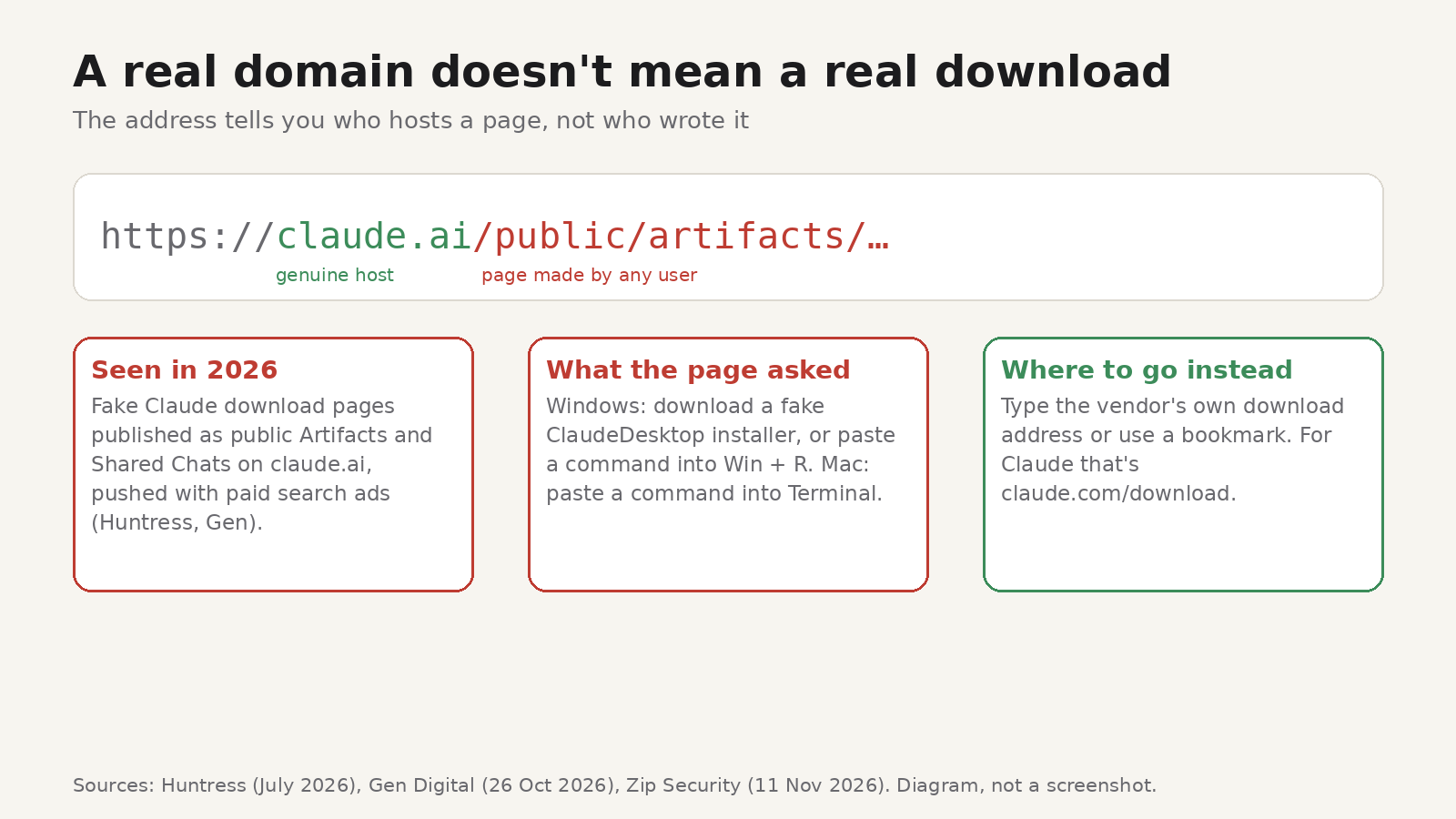
Short answer: Several security teams have found fake "Download Claude" pages hosted on claude.ai, Anthropic's real domain, and pushed to the top of search results with paid ads. The pages were made with Claude's own sharing features, so the address looked right. Download apps only from the vendor's own download page (for Claude that's claude.com/download), never paste a command from a download page into Terminal or the Windows Run box, and check the installer's signature before you open it.
What happened
This isn't one incident. Three reports this year describe the same trick:
- July 2026, Windows. Huntress found that between 21 and 22 July at least 29 organizations were hit after people searched Bing for the Claude desktop app. A sponsored result pointed to a public Artifact on claude.ai that posed as the download page. Its Download button sent visitors to an attacker's site and a fake
ClaudeDesktop.exethat led to a remote-access trojan Huntress identifies as SectopRAT. The page had about 7,100 views before Anthropic removed it. - October 2026, Mac and Windows. Gen Digital described two campaigns using public Artifacts and Shared Chats on claude.ai, promoted with Google Ads. On a Mac, the page told visitors to paste a "quick install" command into Terminal, which installed the Atomic macOS Stealer. On Windows it asked for Win + R, Ctrl + V, Enter, which ran a malicious PowerShell command.
- November 2026, by email. Zip Security wrote about a new employee who got a "Welcome! We use Claude Desktop here" email linking to a claude.ai public Artifact. The download,
ClaudeDesktop.zip, contained the real Claude app plus an infostealer that tried to add itself to Windows Defender's exclusion list. The company's endpoint security caught it.
Claude isn't unique here. Any service that lets users publish pages under its own domain can be used this way. Claude is a popular target because so many people are installing it right now.
Why checking the URL didn't help
The usual advice is to check the address before you click. In these cases the address passed. The domain really was claude.ai, the padlock was there, and the branding matched.
The problem is what a domain tells you. It says who hosts a page, not who wrote it. Shared chats, published artifacts, user profile pages and project sites on code-hosting services all live under trusted domains but contain whatever the user put there. Claude labels these pages "Content is user-generated and unverified", but it's a thin banner that's easy to miss.
Five checks before you run an installer

1. Start from the vendor, not from search
Type the vendor's address yourself or use a bookmark, and go to its download page from there. Skip sponsored results entirely for software downloads: every campaign above used paid ads to get to the top. If a colleague emails you a link, open the vendor's site separately instead of clicking it.
2. Read the whole address, not only the domain
Look at the path after the domain. Words like /share/, /public/, /artifacts/ or a username usually mean user-made content. A real company download page normally sits on its main site at a short, obvious path.
3. Don't paste a command from a download page
This is the trick known as ClickFix. A page shows "quick install" steps that copy a command to your clipboard and ask you to paste it into Terminal, or press Win + R and paste. The command downloads and runs the malware, and because you ran it yourself, many defences don't step in. Gen's advice is blunt: never paste a command you didn't write. Some developer tools are installed with a terminal command, but you should copy those only from the vendor's own documentation, never from a download page you reached through search or email.
4. Check who signed the file
Most commercial desktop apps are code-signed by their publisher. Before opening an installer:
- Windows: right-click the file, choose Properties, and open the Digital Signatures tab. No tab, or an unexpected signer name, is a reason to stop. In PowerShell,
Get-AuthenticodeSignature .\setup.exeshows the same. - macOS: run
spctl -a -vv /Applications/AppName.appto see whether Gatekeeper accepts the app and who it's signed by, orcodesign -dv --verbose=4on the app for more detail.
A valid signature from the expected publisher doesn't prove the app is harmless, but a missing or wrong one is a strong warning.
5. Compare the checksum, but only from the vendor's own page
Some vendors publish a SHA-256 checksum next to each download. If the hash of the file you downloaded matches the one on the vendor's official page, you have the exact file they released. Our own Todofy download page lists a SHA-256 checksum for each installer, for example. Anthropic doesn't list checksums on claude.com/download, so for Claude, the signature check in step 4 is the one that applies.
The catch: a checksum only helps if it comes from a source the attacker doesn't control. A fake download page can show a "checksum" for its own malware. Take the hash from the vendor's main site or official release notes, never from the page that gave you the file. Our guide on how to verify a SHA-256 checksum covers the commands for Windows, macOS and Linux.
Checking a file hash with HashLens
HashLens is our free Chrome extension for identifying, generating and verifying hashes. Its File Hash Verifier opens in its own tab, so you can pick a downloaded installer, paste the checksum from the vendor's page and see whether they match, without the popup closing halfway through. The hashing happens in your browser, so the file you check isn't uploaded.
It's one check among the five above, not a replacement for them. A matching hash tells you the file is the one that page lists. Whether that page is genuine is still up to checks 1 and 2. The same care applies to browser extensions, which don't come with a checksum at all: before you add one, look at what it asks to access. Our guide to what data browser extensions can see explains the permission warnings.
If you think you already ran a fake installer
Treat the computer as compromised. Gen's guidance for these campaigns is a good starting point:
- From a different, clean device, change the passwords that matter most (email, banking, crypto exchanges first), sign out of all other sessions, and turn on multi-factor authentication.
- If you use crypto wallets, move funds to a wallet created from a new recovery phrase, and reinstall wallet apps only from the official vendor. Never type a recovery phrase into an app that unexpectedly asks for it.
- At work, tell your IT or security team straight away, even if nothing seems wrong. The Zip Security case was caught because the endpoint tool saw what the file did, not because anything looked strange.
FAQ
Is Claude itself unsafe?
No. These campaigns abused sharing features to host fake pages, they didn't compromise Anthropic's systems. The genuine desktop app is available from claude.com/download.
Are claude.ai Artifact links dangerous?
Reading one is fine. Downloading software from one, or following install steps on one, isn't. The same goes for shared chats and any user-published page on any site.
Would antivirus have stopped it?
Not reliably. In the Zip Security case the malware tried to exclude itself from Windows Defender scanning, and the ClickFix variants run through commands you type yourself. Keep security software on, but don't rely on it alone.
Does a matching checksum mean a file is safe?
It means the file is identical to the one the publisher listed. If you got the checksum from the vendor's official site, that's strong evidence you have the real release. It says nothing about a file whose checksum came from the same suspicious page.