Short answer: On 17 November 2026, two malicious versions of Microsoft's agent-framework package, 1.26.1 and 1.26.2, were published to PyPI. They ran a credential stealer every time Python started, even if the package was never imported. Both have been removed. If you installed either version, treat that machine or CI runner as exposed: remove the package and its startup files, rebuild the environment, and rotate every secret it could reach. The last clean version is 1.26.0. Longer term, pinning exact versions with SHA-256 hashes stops an unreviewed release from slipping into your installs.
What happened
According to Wiz, version 1.26.1 of agent-framework, the meta-package for Microsoft Agent Framework, was uploaded to PyPI at 20:35 UTC on 17 November. Version 1.26.2 followed at 21:08 UTC, 33 minutes later. By 21:30 UTC neither was available on PyPI. Wiz says the package gets about 41,000 downloads a week.
The malicious releases didn't come from the project's normal release process, as far as researchers can tell. Wiz notes there is no matching tag or release in the microsoft/agent-framework repository, the main branch doesn't contain the code, and 1.26.1 was published as a wheel only, while legitimate releases ship a wheel and a source distribution together. The root cause hadn't been confirmed at the time of writing.
Why a .pth file is so dangerous
You didn't need to import anything for this attack to work. Each release added a .pth file to the top of site-packages. Python reads .pth files every time the interpreter starts, and a line in one that begins with import is executed. So the stealer ran whenever Python started in that environment: running a script, a test suite, a notebook kernel or a CI job.
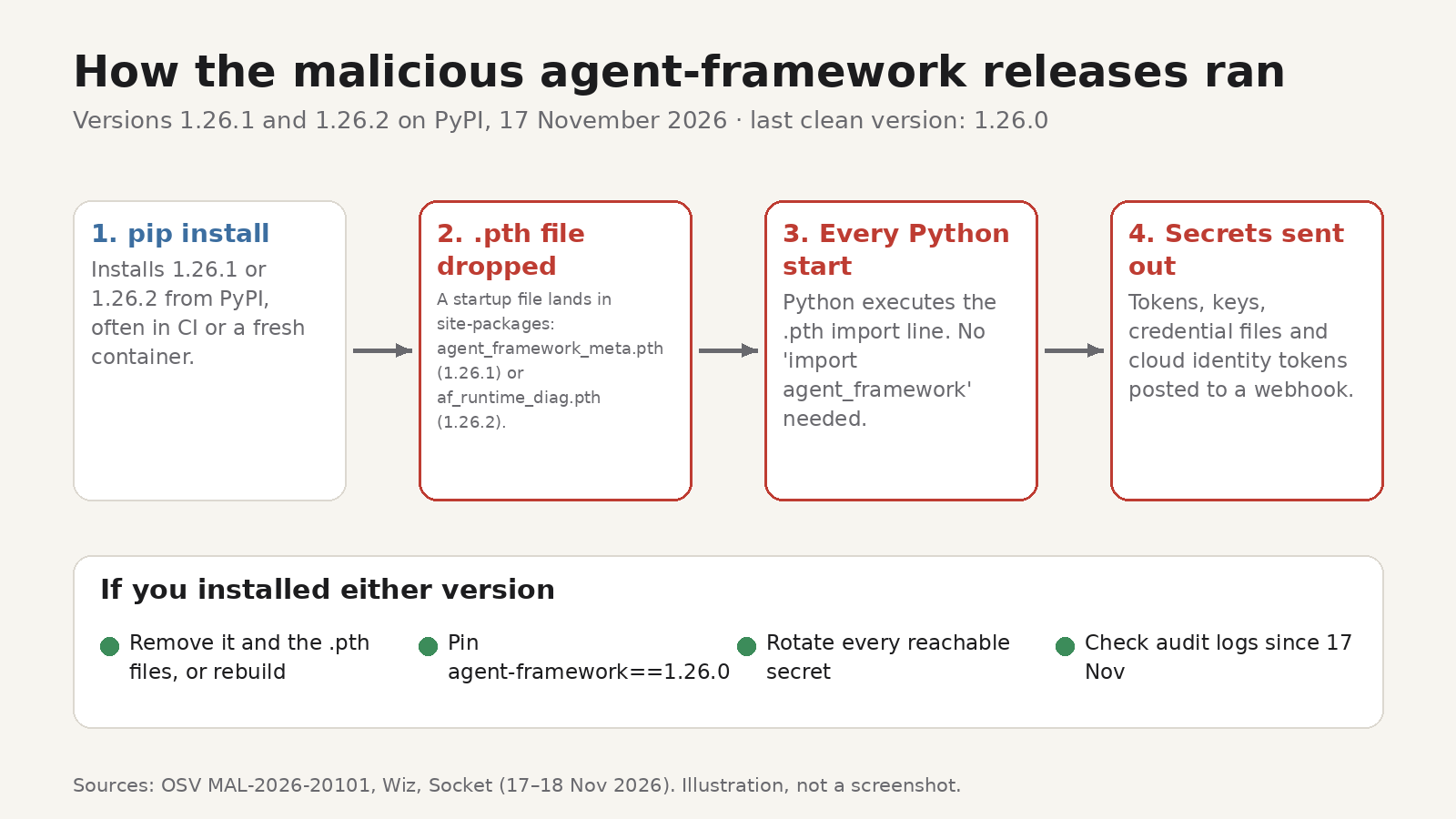
The OSV advisory MAL-2026-20101 lists the files:
- 1.26.1:
agent_framework_meta.pthandagent_framework_meta/_telemetry.py - 1.26.2:
af_runtime_diag.pthandaf_runtime_diag.py. In this versionagent_framework_meta/__init__.pyis identical to the clean 1.26.0 file, so checking only that file misses it.
The code was dressed up as telemetry ("runtime diagnostics"), detached into a background process, and silenced its own errors so nothing visibly broke.
What it stole
The advisory and Socket's analysis describe a stealer focused on cloud and CI credentials. It collected:
- environment variables whose names contain strings such as TOKEN, SECRET, PASSWORD, KEY, AZURE, AWS, GITHUB, OPENAI, HF_, NPM or PIP
- secret-looking values from other processes' environments
- credential files such as
~/.azure,.npmrc,.netrc,.git-credentials,.docker/config.json, Hugging Face tokens and.envfiles - Azure DevOps and Azure managed-identity tokens, and in 1.26.2, GitHub Actions OIDC tokens
Everything was compressed, encoded and sent in a single HTTPS request to a webhook.site address.
Check whether you're affected
Run these in every environment that might have installed or upgraded agent-framework on 17 November, including virtual environments, Docker images and CI caches.
1. Check the installed version.
python -m pip show agent-frameworkIf it says 1.26.1 or 1.26.2, you're affected. Also check lock files and CI logs for those versions, because a job may have installed one and then been thrown away.
2. Look for the startup files. Print your site-packages folders:
python -c "import site; print(site.getsitepackages())"Then look in each folder for agent_framework_meta.pth, af_runtime_diag.pth or af_runtime_diag.py. Other .pth files are normal (editable installs and some tools create them), so look for these names specifically.
3. If you find either version:
- Uninstall it and delete the files above, or better, rebuild the environment or container image from scratch.
- Pin
agent-framework==1.26.0until a new release is confirmed clean. - Rotate every secret that machine or job could reach: cloud credentials, GitHub and CI tokens, package registry tokens, API keys in
.envfiles. Rotating means issuing new ones and revoking the old ones, not just changing where they're stored. - Review cloud and repository audit logs for activity you don't recognise since 17 November.
How hash pinning helps next time
Most Python projects list dependencies with loose version ranges, so a fresh install picks up whatever is newest that day. That's how a malicious release reaches you within minutes of being published. Pinning with hashes changes the rule from "the newest matching version" to "exactly these files, byte for byte".
pip supports this in its hash-checking mode. Each requirement is pinned with == and followed by one or more SHA-256 hashes:
agent-framework==1.26.0 \
    --hash=sha256:<hash of the wheel you reviewed>
When any requirement has a hash, pip requires hashes for every requirement and every dependency, and refuses to install a file whose hash doesn't match. You can force this with pip install --require-hashes -r requirements.txt.
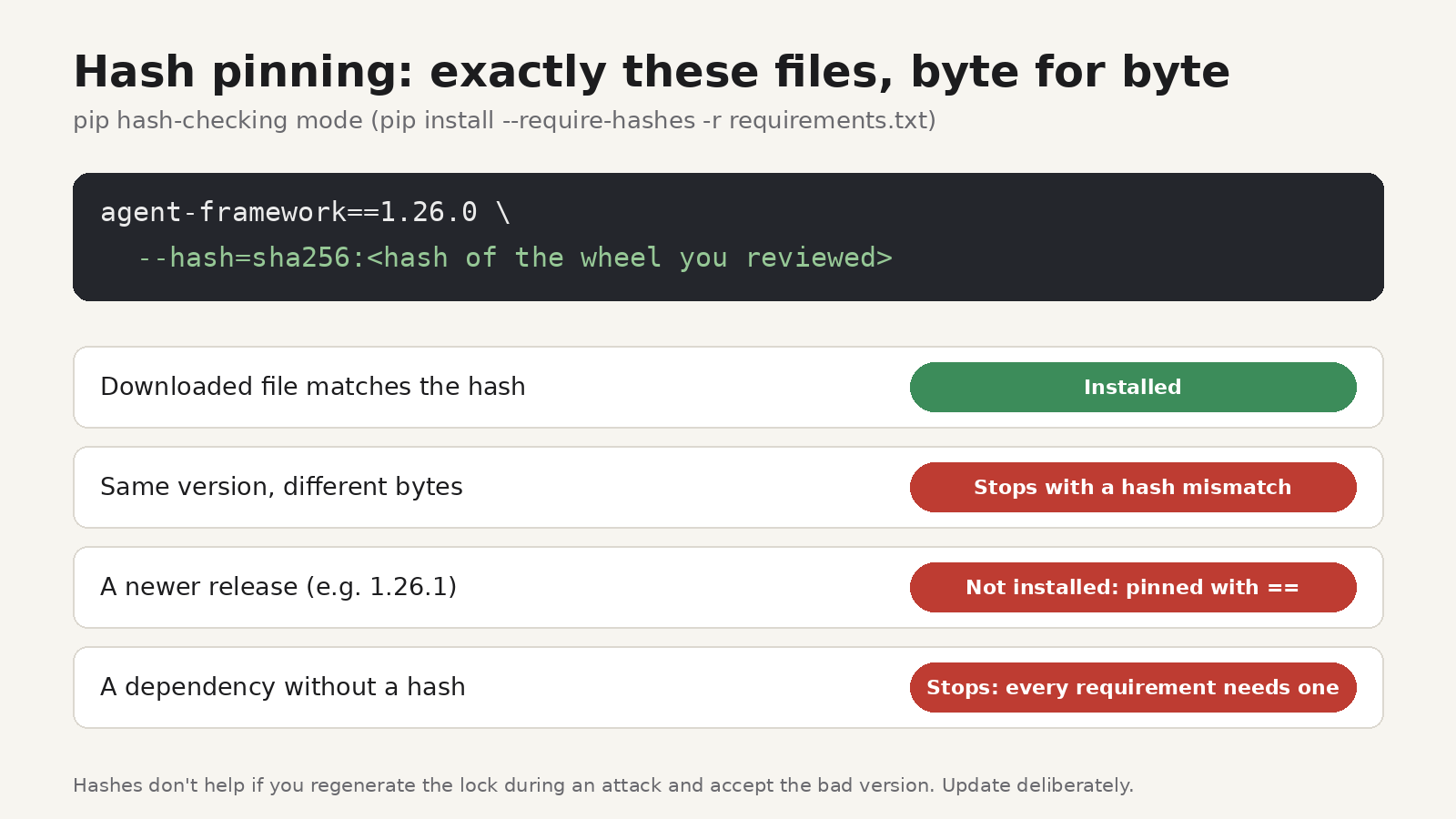
You don't write hashes by hand. Tools generate them for the whole dependency tree:
- pip-tools:
pip-compile --generate-hashes requirements.in - uv:
uv pip compile requirements.in --generate-hashes -o requirements.txt, or useuv lock, which records hashes inuv.lock
Be clear about what this does and doesn't do. Hashes protect you from anything that differs from what you locked: a new malicious version, or a file swapped after you reviewed it. They won't save you if you regenerate the lock file during the attack window and accept the bad version. So update deliberately: regenerate locks as a reviewed change, read what changed, and consider waiting a few days before adopting brand-new releases. uv's --exclude-newer option, which ignores packages uploaded after a given date, makes that easy to enforce. pip's documentation also recommends --only-binary :all: to avoid running build code from source distributions.
Spot-checking a single file
Sometimes you just want to confirm that a wheel you downloaded is the one your lock file expects, for example when building an internal package mirror or reviewing an upgrade. pip can print a file's hash:
python -m pip download agent-framework==1.26.0 --no-deps -d wheels
python -m pip hash wheels/<file>.whl
PyPI also shows SHA-256 hashes for every file on a release's "Download files" page. Pip's documentation is clear that a hash fetched from the index isn't proof against tampering on its own, so compare against the hash in your reviewed lock file.
If you'd rather do the comparison in your browser, HashLens, our free Chrome extension, has a File Hash Verifier that opens in its own tab. It lets you pick a file and compare its checksum with the one you expect. It runs locally in your browser, so the file isn't uploaded anywhere. Our guide to verifying a SHA-256 checksum covers the same check from the command line on Windows, macOS and Linux.
FAQ
Was agent-framework 1.26.0 affected?
No. OSV says 1.26.0 and earlier are not affected, and the malicious releases still depended on the unchanged agent-framework-core 1.26.0.
I only imported the package in a notebook. Am I safe?
No. The .pth file ran on Python startup, whether or not you imported anything. If 1.26.1 or 1.26.2 was installed in that environment, assume its secrets were exposed.
Does hash pinning slow down installs?
Not noticeably. pip checks each downloaded file's hash before installing it. The extra work is keeping the lock file up to date, which tools like pip-tools and uv automate.
Would a malware scanner have caught this?
Several security firms flagged the releases within hours, and PyPI removed them in under an hour. That's fast, but automated installs in CI can pull a new version in seconds. Pinning closes that gap.