Short answer: On 16 November 2026, attackers slipped malicious JavaScript into an Optimizely product that many large websites load on their pages. For most of that day (about 14 and a half hours by Optimizely's timeline), visitors to some of those sites could have had card details typed into on-page forms copied, or crypto wallet addresses swapped during a transfer. If you paid by card directly on a big-brand site or sent crypto from a website that day, check your statements and transfers. Otherwise, the one thing worth doing is updating any iPhone or iPad on iOS 18.6 or lower. The incident is also a useful reminder of how websites can be compromised without being hacked themselves.
What happened
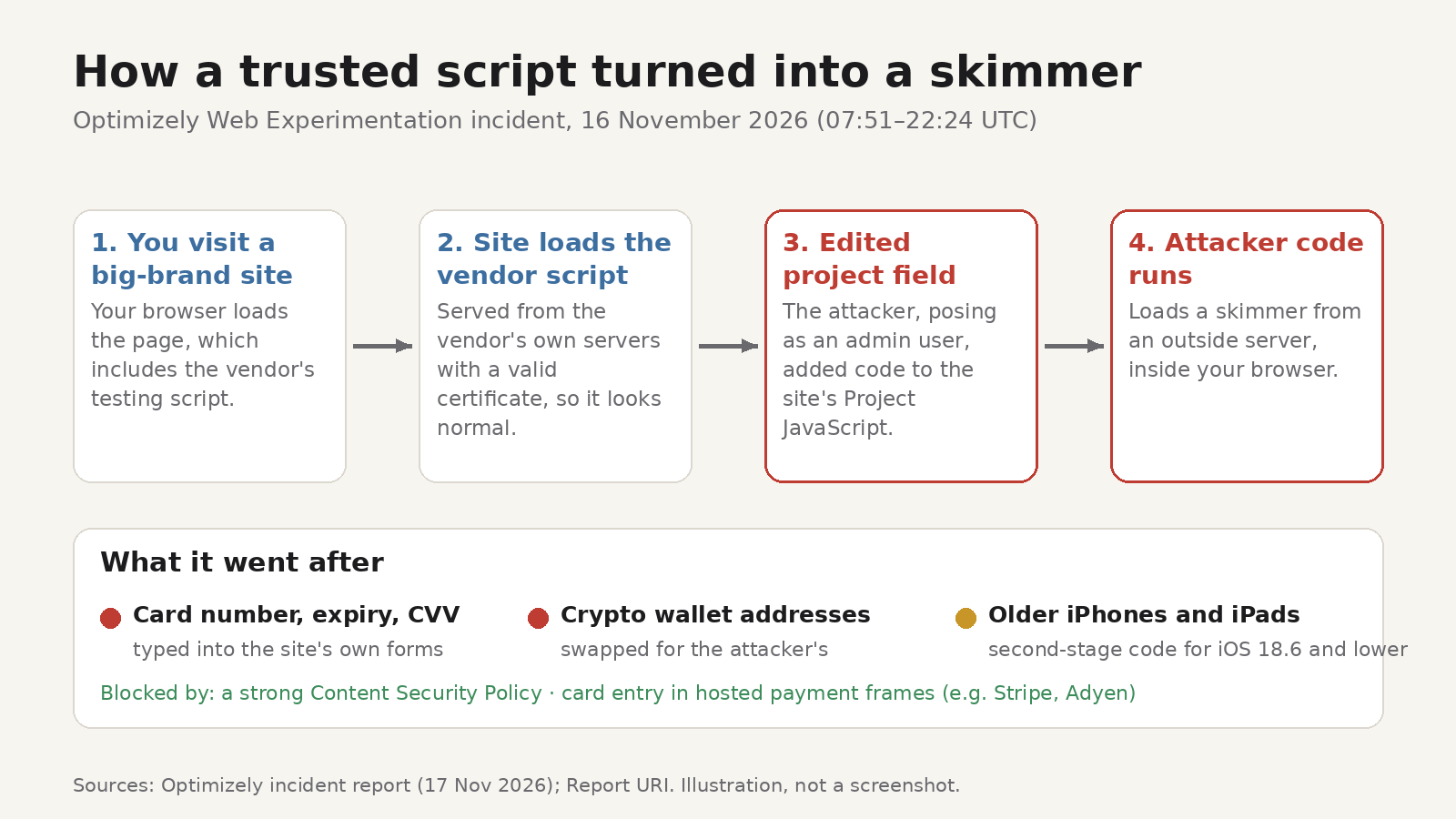
Optimizely is a platform companies use to run A/B tests and personalise their websites. Sites that use its Web Experimentation product load a small script from Optimizely's servers on their pages. That script can include a field called Project JavaScript, which holds custom code written by the site's own team.
According to Optimizely's incident report of 17 November, an attacker abused a flaw in the account signup flow to act as administrator users on customer accounts, without stealing any passwords. Acting as those users, they edited Project JavaScript in targeted projects and added code that loaded a card skimmer from a server they controlled.
The timeline Optimizely published, all on 16 November (UTC):
- 07:51: first malicious code written to a customer project
- 13:34: malicious activity detected
- 16:10: the flaw was closed
- 22:24: the injected code was removed from all affected projects
Security researcher Scott Helme of Report URI spotted the malware the same day. His timeline shows injected code in the BBC's Optimizely snippet from 04:21 UTC, before Optimizely's first entry. His write-up says the code was served to visitors of 178 organisations, including Zoom, the BBC, CNN, Salesforce, GitLab, IKEA, HSBC, Equifax, Air France-KLM, Ledger and Peacock. BleepingComputer reports that Helme's team found 188 infected Optimizely script files after analysing 1,611.
What the malicious code did
Researchers and Optimizely describe a multi-purpose kit. Based on Report URI's analysis as reported by TechTarget and Optimizely's report, it:
- Skimmed payment cards. It tried to capture the card number, expiry date and CVV from forms on the page itself.
- Swapped crypto wallet addresses. It watched pages for wallet addresses and replaced them with the attacker's, so a transfer would go to the wrong place.
- Took cookies and screenshots. Optimizely says readable cookies, the page URL and a screenshot were sent only on pages where it had swapped a wallet address.
- Targeted iPhones and iPads. On iOS and iPadOS it loaded a second-stage script aimed at versions 18.6 and lower. Helme identified the payloads as the Coruna and DarkSword exploit kits.
TechTarget, citing Report URI, put the confirmed crypto theft at about $7,000 as of the evening of 16 November. No figure for stolen card numbers has been published.
Who was actually at risk
Not every visitor to every listed site was exposed. Optimizely's report makes several distinctions that matter:
- Only one product was involved. Web Experimentation was affected. Optimizely says Feature Experimentation, its SDKs and legacy Full Stack were not.
- Not every customer was targeted. Optimizely says it has confirmed directly with each customer whether they were affected.
- Hosted payment pages were out of reach. Card details typed into a payment provider's embedded frame, such as Stripe or Adyen, were not accessible to the script. The risk was to cards typed into forms that are part of the site's own page.
- Some sites blocked it. The skimmer loaded from an outside domain, so Optimizely says sites with a strong Content Security Policy (CSP), a browser rule that limits where a page may load code from, were protected. Report URI found the details mattered: where a policy allowed
unsafe-eval, as at HSBC, an inline copy of the code could still run. - Timing matters. Optimizely puts the exposure window at 07:51 to 22:24 UTC on 16 November and says the exact window differs from site to site. Report URI saw injected code from 04:21 UTC.
What to do if you might have been exposed
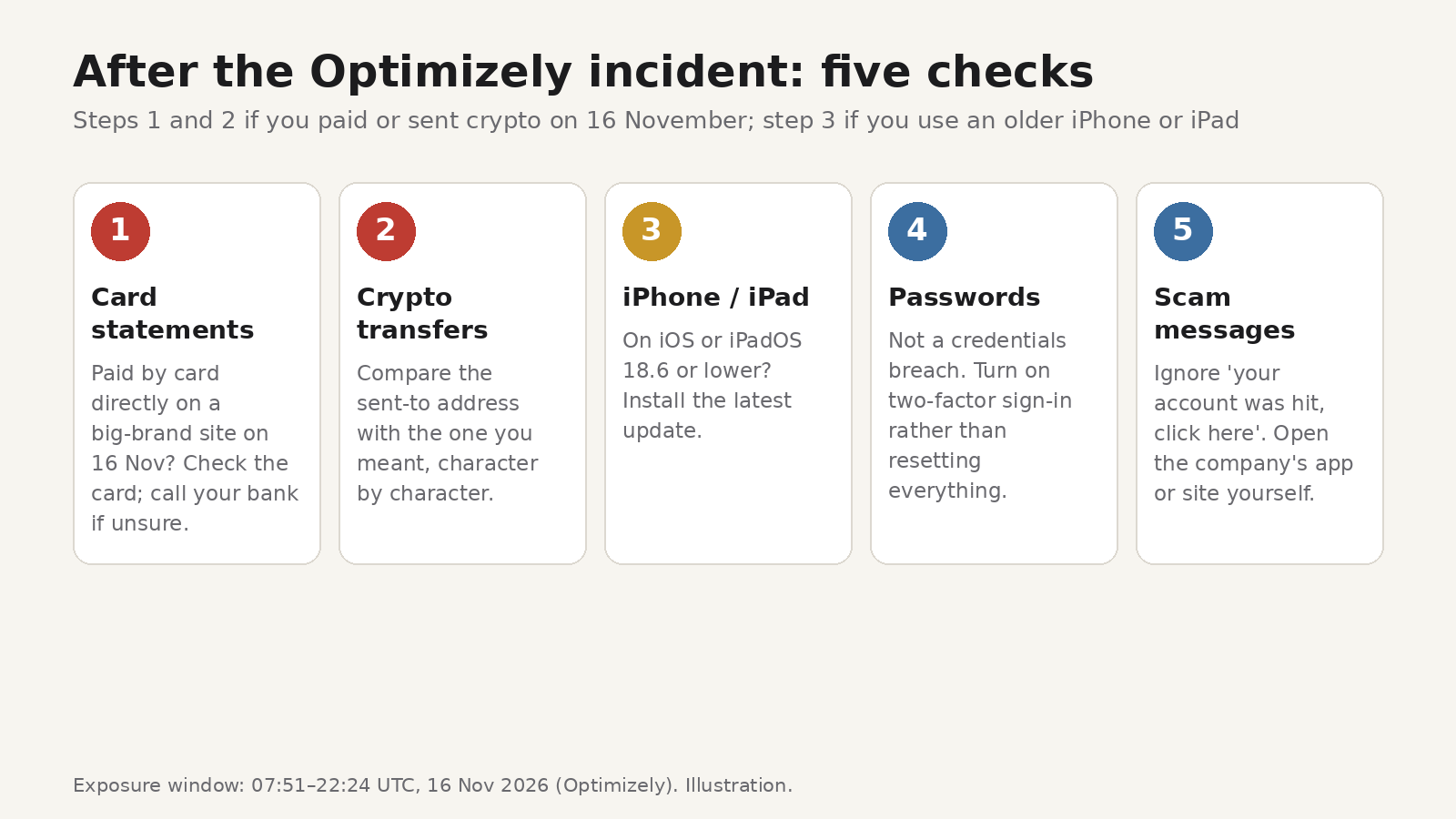
Work through these in order. If you didn't pay or send crypto on a website that day, skip to step 3.
1. Check your card statements
If you entered card details directly on a large brand's website on 16 November, look at that card's recent transactions. If you see anything you don't recognise, or you simply want peace of mind, contact your bank or card issuer. Banks can block and reissue a card quickly. You don't need to prove you were affected to ask.
2. Check any crypto transfer you made from a website that day
The script replaced wallet addresses on the page. Compare the destination address in your wallet's transaction history with the address you meant to use, character by character. If they differ, contact the service you sent from straight away. Crypto transfers usually can't be reversed, so speed matters for any chance of help.
For the future, a few habits make address swaps much harder:
- Confirm the full address on your wallet's own screen, especially a hardware wallet, not just on the website.
- Use your wallet's saved address book for people and services you pay regularly.
- Send a small test amount first when an address is new to you.
3. Update your iPhone or iPad
The second-stage code targeted iOS and iPadOS 18.6 and lower. If your device is on an older version, install the latest update under Settings > General > Software Update. That's good practice anyway, since exploit kits rely on devices that are behind.
4. Don't reset every password because of this
Optimizely says this was not a credentials breach and that the script did not send other form fields or read session or local storage, based on the version it recovered. Changing passwords won't undo a skimmed card. If you want a security task for the day, turn on two-factor authentication for your bank and email instead.
5. Watch for follow-up scams
Big incidents attract fake "your account was compromised, click here" emails and texts. Your bank won't ask for your full card number or PIN by email. If a message about this incident asks you to log in or pay something, go to the company's site or app directly instead of using the link.
Why "trusted" scripts are a weak point
The uncomfortable part of this story is that none of the affected brands were breached in the usual sense. As Helme told TechTarget, "their own infrastructure was untouched; a vendor's script turned hostile and their sites served it to every visitor."
Modern websites load code from many outside companies: analytics, advertising, chat widgets, testing tools. Each one runs with the same access to the page as the site's own code. The malicious file in this case was still served from Optimizely's own servers with a valid certificate, so nothing looked out of place to a visitor's browser.
As a visitor, you can't audit every script on every site. What you can control:
- Use a digital wallet or the payment provider's own checkout when a site offers it, so your card number isn't typed into the site's own form.
- Keep your browser and devices updated so exploit code has less to work with.
- Be selective about extensions. Browser extensions can read pages too. Our guides on what data browser extensions can see and checking that your extensions are up to date cover what to look for.
- A content blocker can help, but it isn't a guarantee. Blockers stop scripts from known bad domains. They can't know about a brand-new attacker server on day one.
FAQ
Which websites were affected?
Report URI's list of 178 organisations includes Zoom, the BBC, CNN, Salesforce, GitLab, IKEA, HSBC, Equifax, Air France-KLM, Ledger and Peacock. Not every page or every visitor on those sites was exposed, and some had protections in place.
Is it safe to visit those sites now?
Optimizely says the injected code was removed from all affected projects by 22:24 UTC on 16 November and that delivery of the malicious code is now blocked.
I paid through a payment provider's own checkout. Was I at risk?
The script targeted card details typed into forms on the site itself. Optimizely says cards entered in hosted payment frames, such as Stripe or Adyen, were not accessible to it. If you didn't type your card number into the site's own page, your card details were outside what the script was built to capture.
Do I need to do anything if I only browsed?
Only one thing. Browsing alone didn't expose card details, but the second-stage code targeted iPhones and iPads on iOS 18.6 and lower, so update yours if it's on an older version.