Short answer: A password hash is a one-way fingerprint of your password, not the password itself. When hashes leak, attackers can't read them directly, but they can try guesses offline until one matches. How long that takes depends on the hashing algorithm and on how strong your password is. Change the password on the affected service, change it anywhere else you reused it, and turn on two-factor authentication.
"Password hashes" turned up in several breach notices in early November 2026. Chainalysis said in its security incident updates that names, usernames, password hashes and live tokens for all of its users had been exposed, and that a separate attack exposed some customers' actual passwords. It required every user to reset their password and rotate API keys where applicable. In Japan, the service Fancrew reported that password hashes of about 1.03 million direct members were among leaked records, according to JapanHacked.
If you got one of those emails, or you're wondering what the phrase means the next time you see it, here's how to read it.
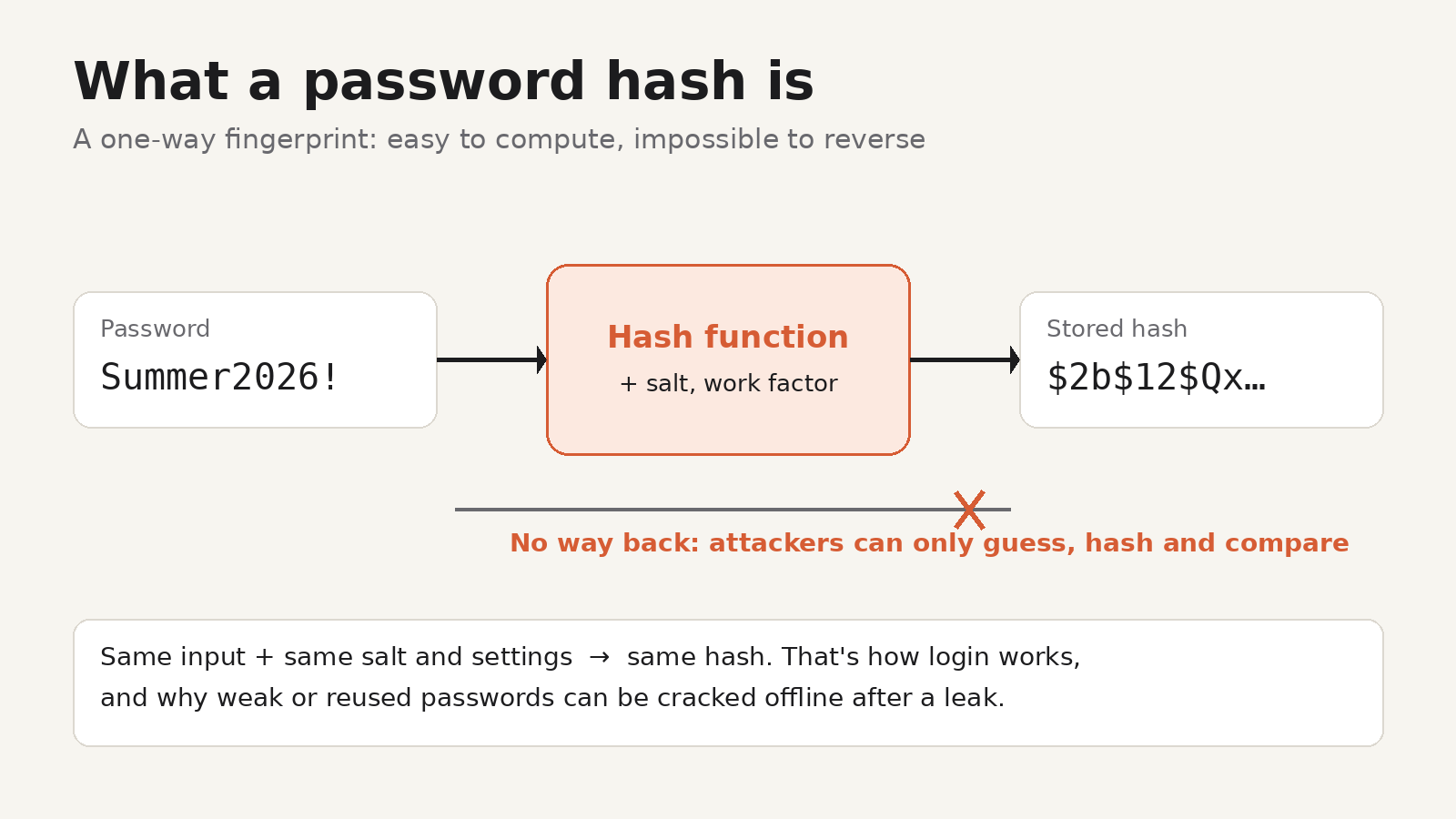
What a password hash is
A well-run service doesn't store your password. When you sign up, it runs the password through a hash function, which turns any input into a fixed-length string, and stores that. When you log in, it hashes what you typed and compares the result with the stored hash. If they match, you're in.
Two properties make this work:
- One-way. You can't run the function backwards to get the password from the hash.
- Deterministic. The same input with the same settings always gives the same output.
The second property is also the weakness. An attacker with a list of hashes can take a guess, such as Summer2026!, hash it the same way, and see whether it matches any stored hash. They can repeat this billions of times on their own hardware, with no login page to slow them down and no lockout after failed attempts. That's called offline cracking.
Why the algorithm matters
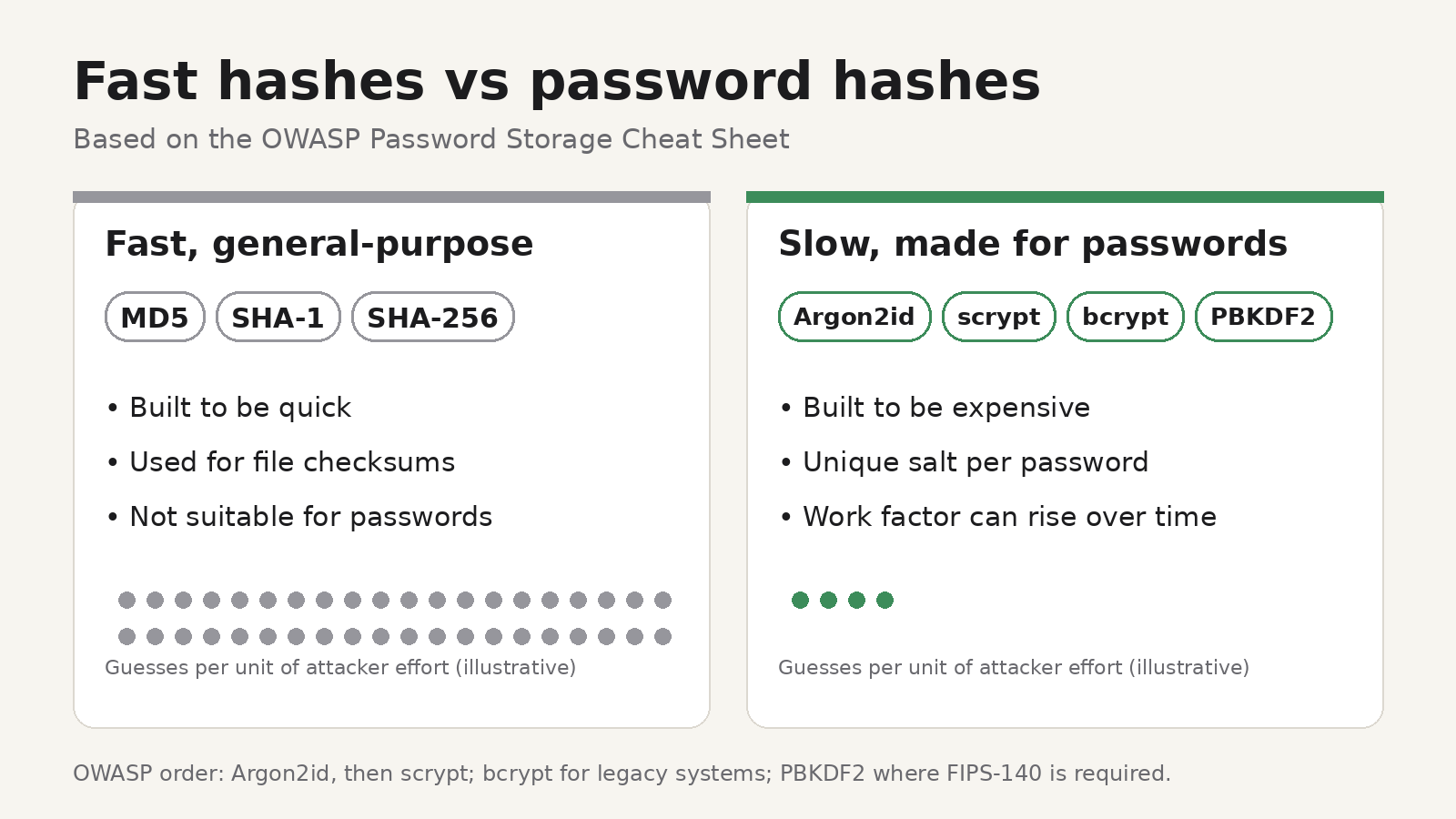
Not all hashes are equally hard to crack. The OWASP Password Storage Cheat Sheet, a widely used reference for developers, splits them roughly into two groups.
Fast, general-purpose hashes: MD5, SHA-1, SHA-256. These were designed to be quick, which is what you want for checking a file download but not for storing passwords. OWASP says fast algorithms like SHA-256 aren't suitable for passwords because they let attackers make huge numbers of guesses quickly. MD5 and SHA-1 have additional weaknesses on top of being fast.
Slow password hashes: Argon2id, scrypt, bcrypt, PBKDF2. These are deliberately expensive to compute, and the cost can be raised over time with a work factor. Each guess takes far longer, so cracking a list of them takes far longer too. OWASP recommends Argon2id first, scrypt if Argon2id isn't available, bcrypt for legacy systems, and PBKDF2 where FIPS-140 compliance is required.
Salt matters as well. A salt is a random value added to each password before hashing. With unique salts, two users with the same password get different hashes, and attackers can't use precomputed tables. They have to attack each hash separately. Libraries for bcrypt and Argon2id usually generate a unique salt for you and store it inside the hash string.
So "your password hash was exposed" can mean very different things. OWASP says strong passwords stored with modern hashing algorithms and hashing best practices "should be effectively impossible for an attacker to crack." A short or common password stored as unsalted MD5 is a different story.
You can't change the algorithm, but you can change the password
You don't control how a service stores your password, and breach notices often don't say. What you control:
- Change the password on the affected service. Use the service's own login page rather than a link in an email, since breaches are often followed by phishing emails that copy the real notice. Chainalysis gave its customers the same advice.
- Change it everywhere you reused it. Reuse is what turns one breach into several. Attackers try cracked passwords on email, banking and shopping sites.
- Use a password manager so each site gets a long, random, unique password. A random password is far harder to guess from a hash than anything based on words, names or dates.
- Turn on two-factor authentication with an authenticator app rather than SMS, or switch to a passkey if the service offers one.
- Sign out of other sessions and revoke tokens or API keys if the service offers it. In the Chainalysis case, live tokens were exposed alongside the hashes, and a token can work without the password.
- Watch for phishing. Expect emails that mention the breach and ask you to "verify" your account.
If you run a service: check what you're storing
If you're a developer, a breach in the news is a good reminder to check your own password storage.
- Look at what your database stores. Modern password hashes are usually stored in a self-describing format. A bcrypt hash starts with
$2a$,$2b$or$2y$followed by the cost, and an Argon2 hash starts with$argon2id$(or$argon2i$,$argon2d$) followed by its parameters. A plain 32-character hex string is usually MD5, a 40-character one SHA-1, and a 64-character one SHA-256, none of which should hold passwords. - If you find fast hashes, OWASP describes how to migrate: re-hash with a modern algorithm when each user next logs in, or wrap existing hashes in a modern one and replace them over time.
- Check the work factor. OWASP's minimum for bcrypt is 10, and it lists minimum memory and iteration settings for Argon2id.
To check an unknown hash quickly, HashLens, a Chrome extension made by UnifyBrowse, identifies it from its format. Paste a hash and it suggests the likely algorithm (MD5, SHA-256, bcrypt, NTLM, Argon2 and 20+ more), shows the matching Hashcat mode and John the Ripper format, and gives each algorithm a Secure, Weak or Broken rating with a plain-English reason. It runs locally in your browser and is free. Some formats, such as a bare 64-character hex string, fit more than one algorithm, so treat the result as a list of likely candidates and confirm it against your code. The guide on how to identify a hash type explains the patterns in more detail.
Only analyse hashes you're authorised to handle, such as your own systems or a test environment.
Hashes you'll still see outside passwords
Fast hashes aren't bad. They're just the wrong tool for passwords. SHA-256 is the right choice for checking that a downloaded file hasn't been changed, and many software projects publish SHA-256 checksums for exactly that. If that's what you need, see how to verify a SHA-256 checksum or how to generate a SHA-256 hash.
FAQ
Can a password hash be decrypted?
No. Hashing isn't encryption, so there's no key that reverses it. Attackers recover passwords by guessing and comparing hashes, which works best against weak passwords and fast algorithms.
Is my password safe if only the hash leaked?
It depends on the algorithm and on your password. A long, random, unique password stored with bcrypt or Argon2id is very hard to recover. A common or reused password is at risk, especially with a fast hash like MD5. Changing it is the safe choice either way.
What's the difference between a hashed and a plaintext password leak?
A plaintext leak exposes the password itself, so it can be used right away. A hash leak exposes a fingerprint that attackers must crack first. Both mean you should change the password and any reused copies.
How can I tell which hash algorithm a service used?
Breach notices sometimes say. If you have the hash itself, for example from your own system, its length and prefix usually point to the algorithm. A tool like HashLens can suggest likely matches from the format.